Stocktaking
Hinweis
Stocktaking can no longer be deleted as soon as stocktaking lines have been marked as counted or an assigned open cycle counting list exists.
The stocktaking process describes the systematic recording and verification of all warehouse inventory. SIEVERS WMS supports various stocktaking types that are used depending on the application and operational situation.
Stocktaking in SIEVERS WMS
SIEVERS WMS provides comprehensive support for all legally required and operationally useful stocktaking procedures. Stocktaking is managed centrally via the Stocktaking page. Count lists are processed directly on the MDE device (B5 Stocktaking). Setup parameters such as the stocktaking period, number series, and threshold values are stored in the SIEVERS WMS setup.
In addition to the classic annual stocktaking, continuous and event-driven procedures are also supported, which can be integrated into ongoing warehouse operations.
Process Variants
The choice of stocktaking variant depends on the occasion, warehouse type, and operational requirements. New start-ups and warehouse transitions require different procedures than routine operations.
| Variant | Description | When to use? |
|---|---|---|
| Stocktaking Setup | Basic setup and master data maintenance for all stocktaking types | Before the first stocktaking run and when adjusting parameters |
| Key Date Stocktaking | Complete inventory count at a fixed date | Annual mandatory stocktaking, legal requirements |
| Initial Stocktaking | Structured inventory takeover for go-live | Go-live, new warehouse area without inventory history |
| Empty Storage Place Stocktaking | Continuous verification of empty and occupied storage places during operations | Permanent inventory maintenance, prevention of empty place errors |
| Inventory Adjustment | Direct correction of inventory on the MDE device | Immediate corrections when discrepancies are found |
| Shortage in Picking | Block shortage inventory and search for alternative inventory | Shortfall during withdrawal by picker |
Related Setup
- SIEVERS WMS Setup – Stocktaking parameters
- Blocking Codes – Blocking codes for inventory discrepancies
Add new inventory during a stocktaking
It can happen that during a count it is discovered that there is an unforeseen amount of inventory in a storage place. You can also add this inventory during the count. On the MDE device, use B5.5 New Inventory for this. Continue with the following section.
Hinweis
New inventory found that exceeds the set threshold values is automatically transferred to the second cycle counting list.
Hinweis
Outside storage items can only be entered during an outside storage stocktaking.
With MDE
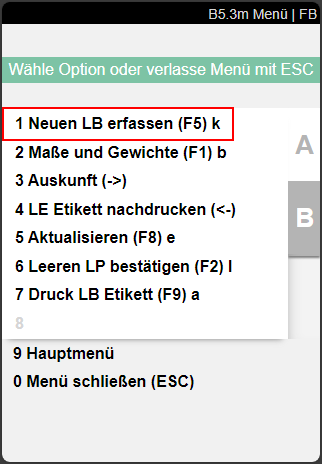
During a stocktaking, you can add new inventory in B5.3 by pressing F5 or via the menu B5.5.
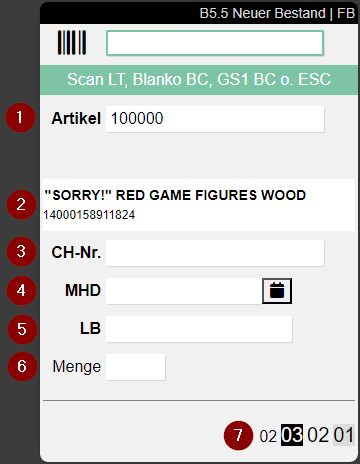
- Scan the item you have just found (1)
- Scan a Blanco Barcode for a new load carrier or scan an existing load carrier (can also be archived)
- Enter any required fields such as sell-by date or variant (4)
- Enter a quantity (6)
- Confirm the entry with Enter
- Scan another position or exit B5.5 by pressing Escape twice
In a document-oriented stocktaking
In a cycle counting list, you can open the New inventory window via Start.
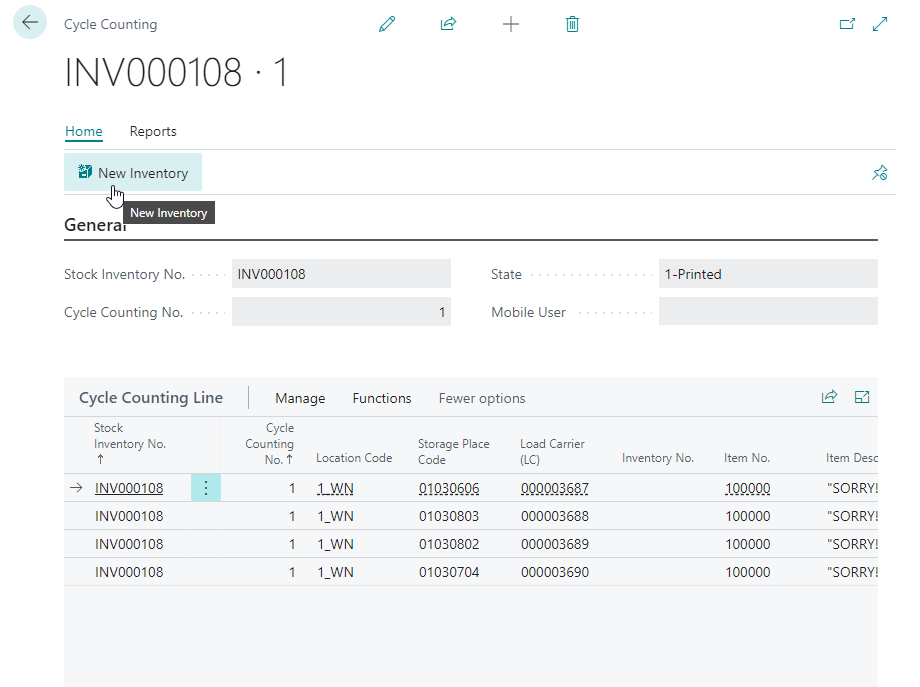
There you can add new inventory in the New Inventory Stocktaking window.
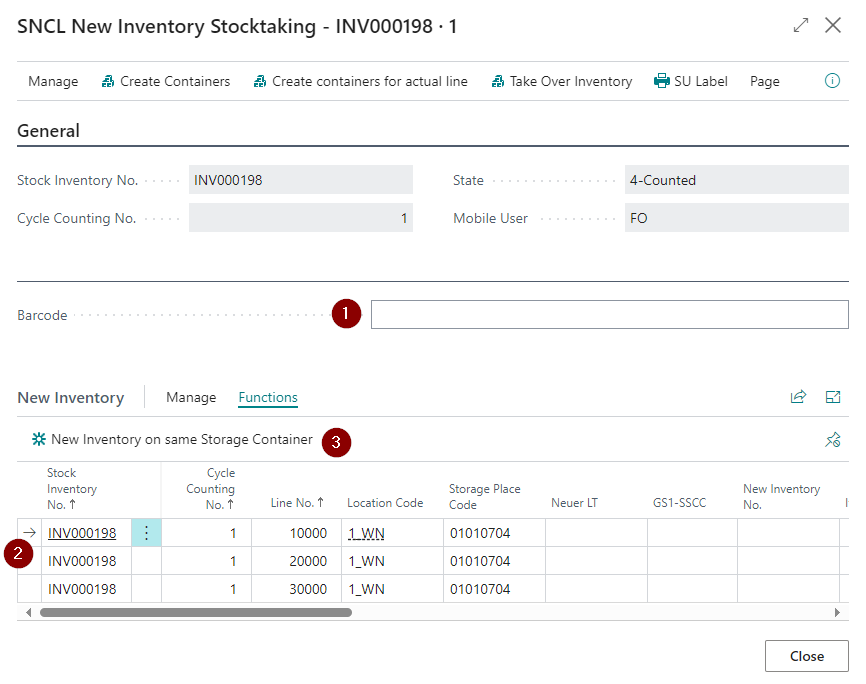
- Scan item/load carrier
- Enter additional information such as the quantity. If the item has variants, a variant must be entered.
- If you want to add new inventory on the same storage load carrier, use the respective function
You can also use this method to enter incorrectly stored inventory in the correct place.
In addition, you can also create new load carriers via the menu actions without having a blanco barcode.