Labels
Various labels are used in SIEVERS WMS. These are documented in the following sections. For terms or abbreviations that are difficult to understand, use the Index or the List of abbreviations.
Hinweis
Weights printed on labels are always rounded up to the last two decimal places.
SPU
This label contains the following information:
- Code
- Dimensions
- Regular barcode
- Number of pieces
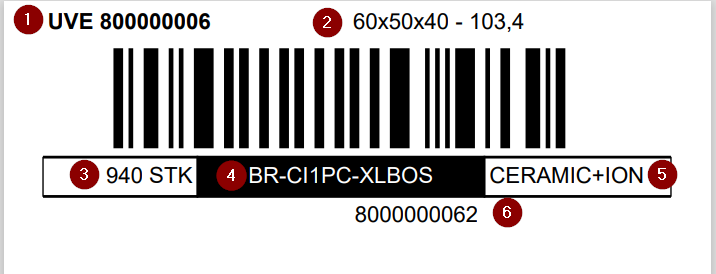
The barcode results from the code and the check digit according to modulo 10.
Inventory label or receipt
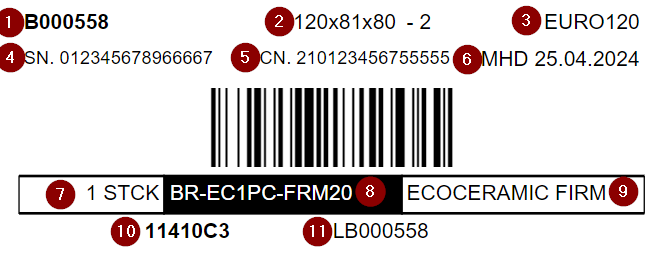
This label contains the following information:
- Inventory number (last 7 characters)
- Dimensions and gross weight
- Inventory measure
- Serial number (last 15 characters)
- Lot no. (last 15 characters)
- Sell-By Date
- Quantity
- Item number (last 14 characters)
- Item description
- Target or current storage place
- Inventory number (last 9 characters)
Hinweis
Do not use inventories to map packing hierarchies. In other words, please do not map a hierarchy in combination with Load Carriers. Load Carrier = pallet and inventory unit = sub-unit - such as carton on the pallet. To map packing hierarchies, transport Load Carriers should always be used in combination with the Load Carrier. Inventories are important for item tracking, not for describing the physical or process-related status.
Item Label
The item label is used for additional labeling of an item. This can be useful in warehouse receipt, for example, if items need to be labeled separately. It can be printed via the item card via Actions or in the warehouse receipt via the Line menu of the document lines.
When printing via the Item Card, the number of pieces printed on the label corresponds to the quantity entered on the request page. When printing from the warehouse receipt, Enter number of load carriers determines the number of labels to print. One label is printed per load carrier, and the quantity per load carrier is printed on the respective label.
- Dimensions: 90x33mm
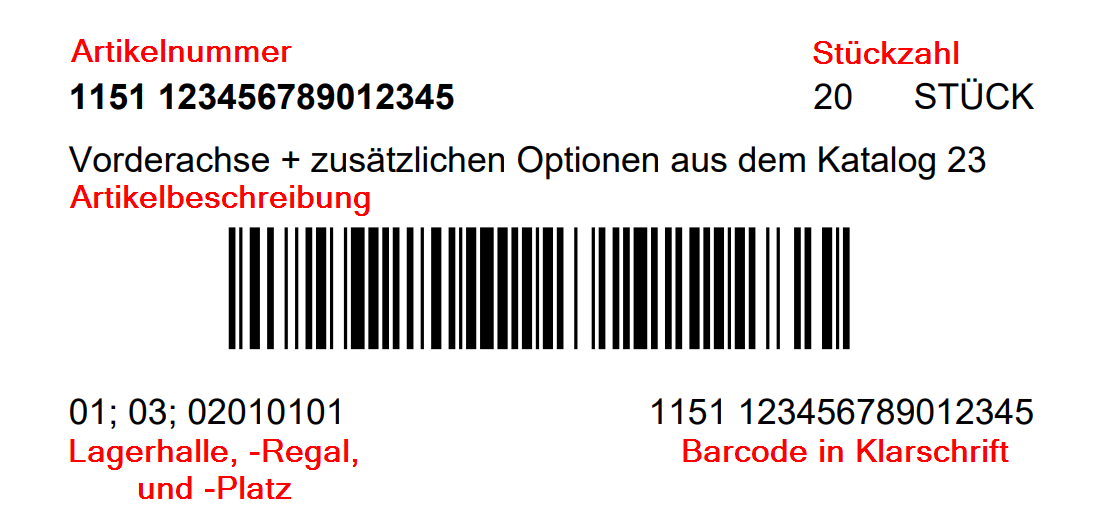
The label contains the following information:
- Item number
- Abbreviated item description
- Number of pieces
- Warehouse
- Storage Shelf
- Storage place
- Barcode
Hinweis
If the item is assigned to a master storage place or picking place, the master storage place is shown at the bottom left instead of the storage place.
Storage place label
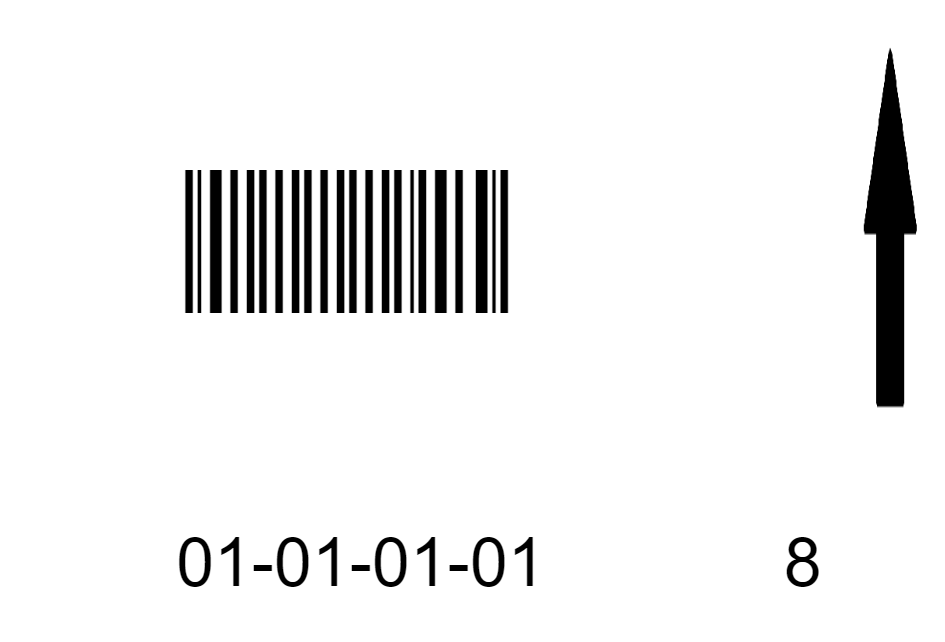
You can print two different storage place labels:
- Large: 101.6mm x 152.4mm
- Small: 90mm x 33mm
You can decide before printing whether an arrow pointing up or down and a check digit should be printed on the side of the label.
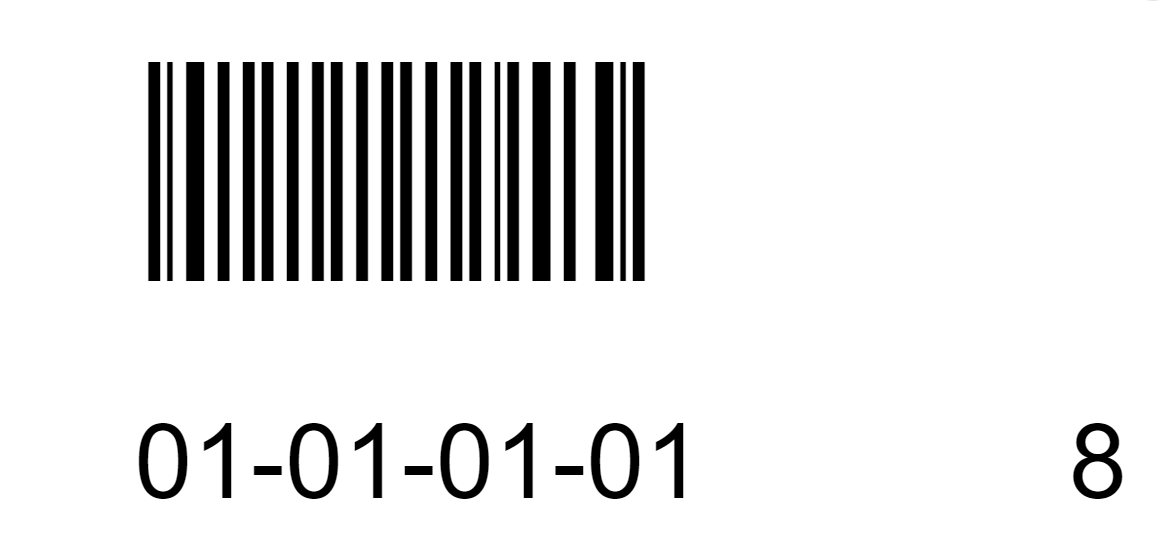
Blanco Barcode
- Dimensions: 90x33mm
The label contains no information other than the barcode itself. It is printed in stock and made available to warehouse receipt. Incoming items or pallets are marked with the label and assigned to this number in the system. The label can also be used to measure times. For example, the unloading time is recorded when the barcode is scanned for the first time.
Login Barcode
The login barcode makes it easier to log in to the MDE device. You do not have to enter your user name and password, but simply scan the barcode.
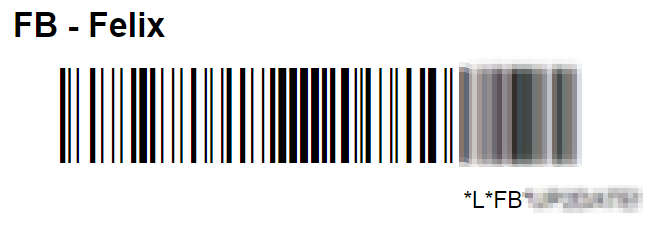
- Dimensions: 90x35mm
The barcode contains the user abbreviation, the user name and the password.
Printer Station Barcode
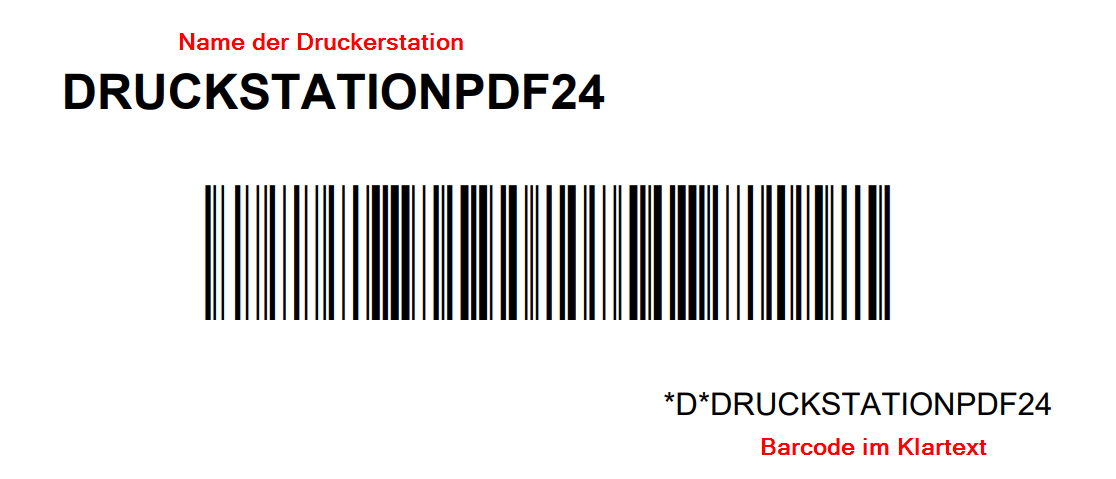
This label is visibly attached to the place of the printer station. Employees who are helping out in other areas for a short time, for example, can scan this barcode in the main menu of the MDE to change the printer station. You can print the label directly in the printer station card.
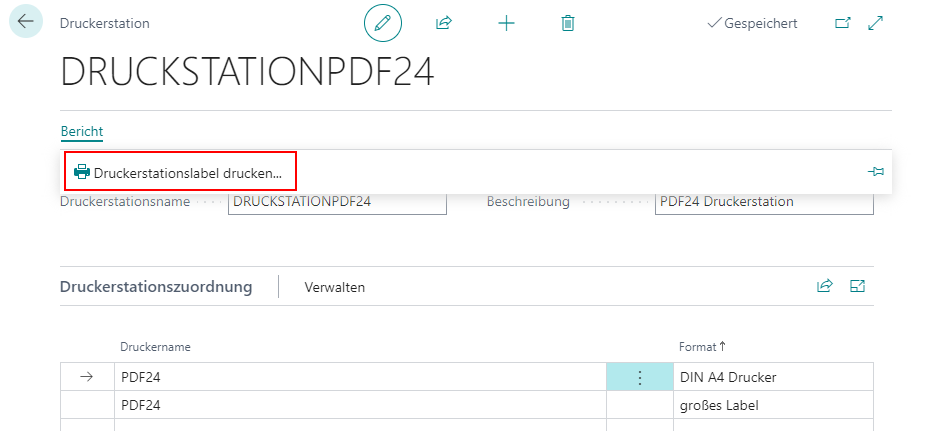
- Dimensions: 90x33mm
The label contains the following information:
- Name of the printer station
- Barcode
- Barcode in plain text
Storage Unit Label
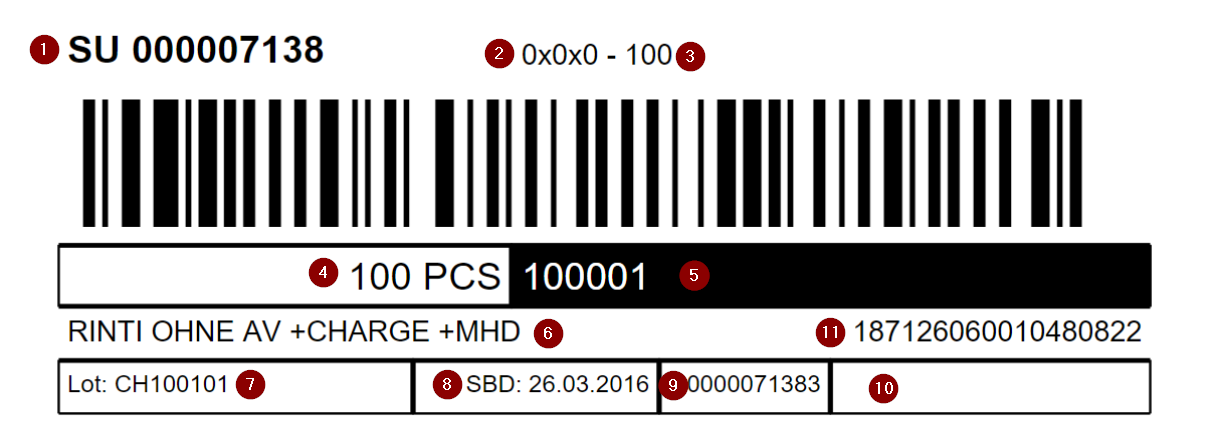
This label is used to mark items arriving in warehouse receipt. Only load carriers that are still to go into the warehouse and have no order reference are marked with this label.
- Dimensions: 90x33mm
- Template dimensions: 88x33mm
The label contains the following information:
- Storage unit number
- Dimensions
- Weight (if available: weighed weight, otherwise gross weight of Load Carrier)
- Quantity
- Item number
- Item description
- Lot No.
- Sell-By Date
- Plain text barcode (If available: GS1 barcode)
- Comment text
- GS1 SSCC
WHS Receipt SU label
- Dimensions: 90x33mm
PTU label
- Dimensions: 90x33mm
The order-related information on this label is taken either from the linked warehouse shipment or from the order or special order if the Load Carrier has already been assigned to the order in the warehouse receipt.
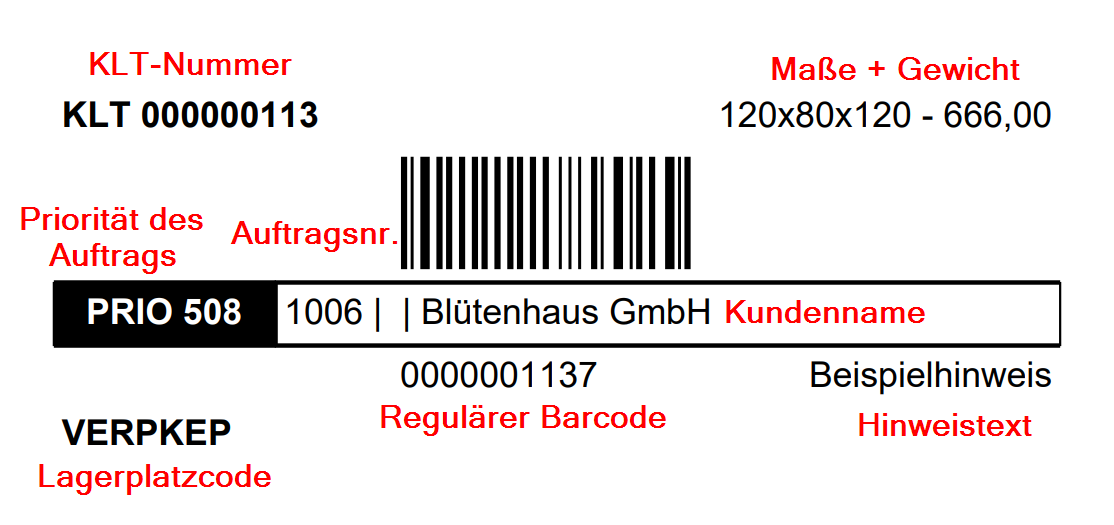
The label contains the following information:
- PTU number
- Dimensions
- Weight
- Priority of the order
- Order no.
- Customer name
- Storage place code
- Regular barcode
- Comment text
STU Label
- Dimensions: 90x33mm
This label is used to mark carriers that are part of a picking series.
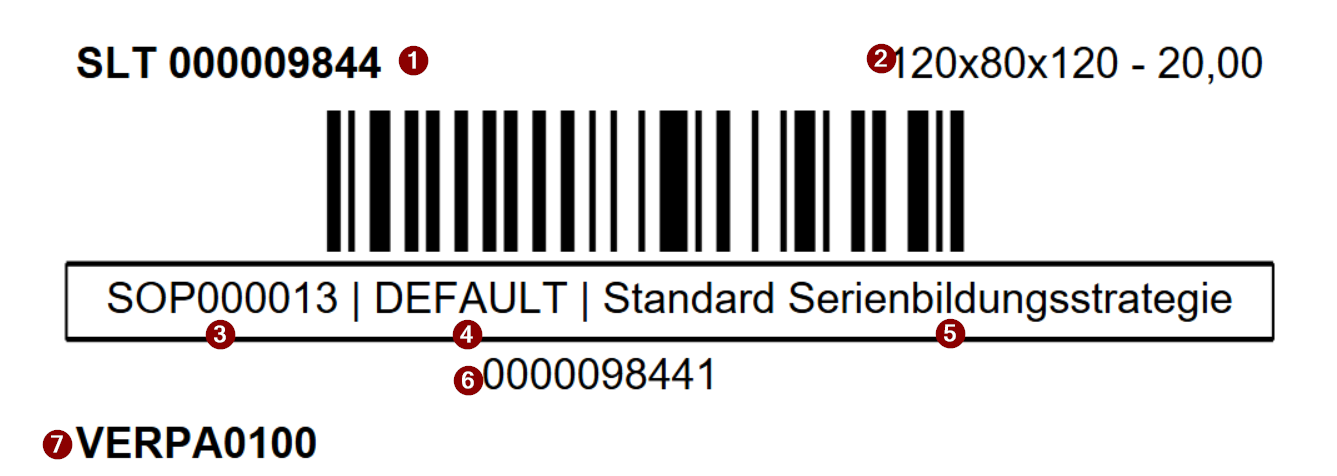
- STU Number
- Dimensions and Weight
- Picking Series No.
- Series Formation Strategy Code
- Series Formation Strategy Description
- Regular Barcode
- Storage Place Code
SSCC Label
- Dimensions: 110x162mm
This label is used to mark finished packages. This allows the package and its contents to be identified both during loading and on arrival at the customer.
The order-related information on this label is either taken from the linked warehouse shipment or from the order or special order if the load carrier has already been assigned to the order in the warehouse receipt.
The last SSCC label printed is stored on the posted load carrier and can be accessed there.
Hinweis
If the order is linked to a shipping label service provider such as ECOMSUITE or ShipXpert via the shipping agent, a label generated by the shipping label service provider will be printed instead of the SSCC label. The prerequisite is that No Shipping Orders is disabled on the shipping agent so that a shipping order is created automatically when the stock document is created. If a shipping order exists, the shipping label is printed automatically instead of the standard SSCC label. The shipping label can be printed via the same routes as the GS1 label: from MDE (F9), from picking documents, packaging processes, or directly from the load carriers.
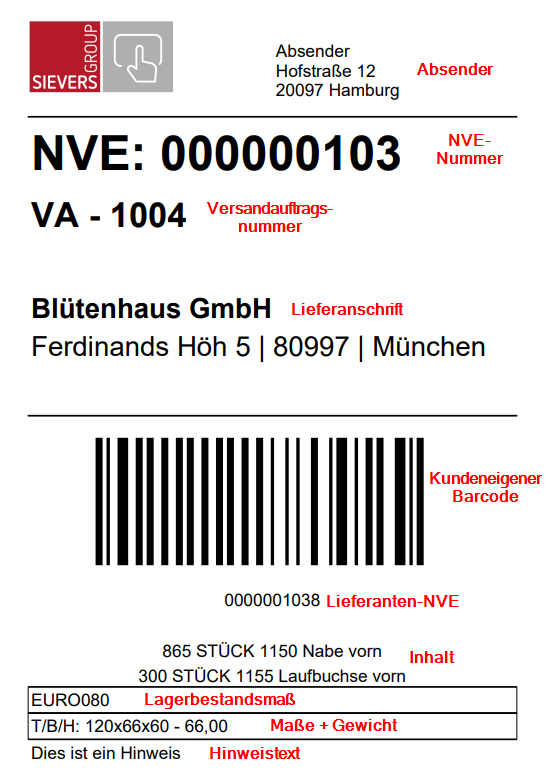
The label contains the following information:
- Sender
- SSCC number
- Shipping order number
- Delivery address
- Customer's own barcode / customer reference
- Vendor SSCC
- Up to two content items - otherwise package content list
- If a PU unit of measure is entered for the item, the quantity is converted to this unit of measure
- Inventory measure
- Stock dimensions
- Weight
- Comment text
Hinweis
The dimensions, weight units and volume values take the setup and conversion of units into account.
GS1 Label Amazon
If the Outgoing PTU/SSCC option is activated in the GS1 setup and in identifier 00 of the customer, this label is used when printing SSCCs for the customers set up in sales orders.
The prerequisite for printing is SSCC status 7 (packed) and the GS1 setup on the customer (data identifiers). The label can be printed via the following routes:
- From MDE Picking (A4) via F9
- From MDE Packing (A5) via F9
- From picking documents via Reports > SSCC Label
- From packaging processes via Reports > SSCC Label
- Directly from load carriers via Reports > SSCC Label
When the GS1 Amazon SSCC label or Amazon PTU label is printed, the load carrier's regular barcode is generated automatically if no barcode reference exists yet.
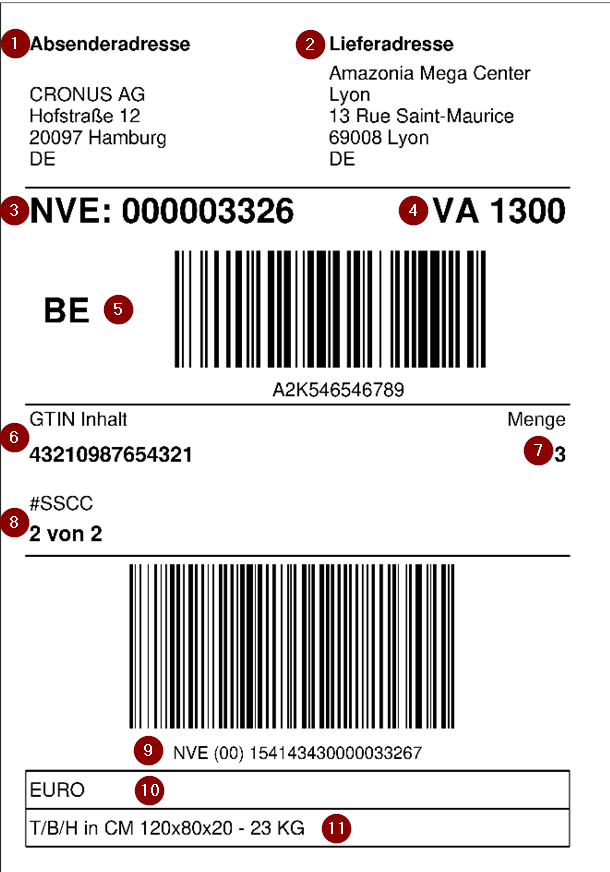
- Sender address
- Delivery address
- SSCC number
- Number of the source document
- External order number and barcode
- GTIN content
- Number of GTINs
- Number of SSCCs in this order
- SSCC number and barcode (the text below the barcode always reads SSCC, regardless of the system language)
- Inventory measure code
- Dimensions and weight
Hinweis
If several items are packaged in one SSCC, MIXED SKU is shown at 6. If source documents with different purchase references are packed in one SSCC, MIXED PO! is shown instead of a barcode at the PO (purchase order) field.
BBD and lot number are printed on the label if the corresponding data identifiers are configured in the customer's data identifier list:
- BBD (MHD): All items in the SSCC have the same BBD: BBD is printed. Mixed BBD values: MIXED BBD! No BBD-tracked items: field is left blank.
- Lot (LOT): All items have the same lot number: lot number is printed. Mixed lots: MIXED LOT NO! No lot-tracked items: field is left blank.
Hinweis
The terms MIXED SKU, MIXED PO!, MIXED BBD! and MIXED LOT NO! are Amazon standard terms and are always printed in English, regardless of the configured system language.
Amazon PTU Label (Picking Transport Unit)
The Amazon PTU label is an additional, smaller label for individual picking units (PTUs) within an order. It is typically printed directly during picking – for example during partial picks using a mobile printer – and accompanies the PTU until loading. This label complements the larger GS1 Amazon SSCC label that is applied to the finished shipment unit.
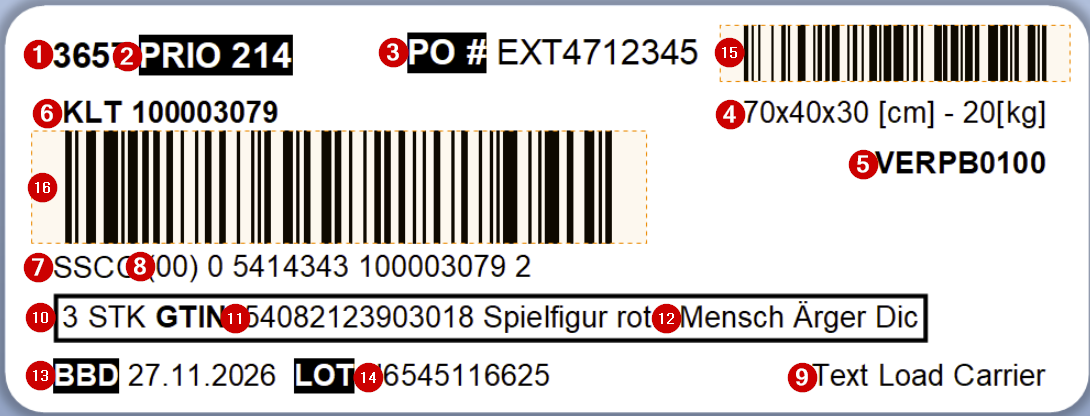
- Source document number
- Priority
- Order reference (PO#) from the source document in plain text; if multiple source documents with different order references are included: MIXED!
- Dimensions and weight of the PTU (units in square brackets from the base unit of measure list)
- Destination of the load carrier
- Load carrier code
- Label SSCC (in the Amazon context never NVE)
- SSCC number in plain text (formed from GS1 prefix, load carrier number and check digit)
- Note text from the load carrier
- Item quantity (DB 37; currently plain text only); if the quantity or unit requires more characters, the item description (12) is shortened accordingly
- GTIN of the item (DB 02); if multiple items are in the PTU: MIXED SKUs!; if no main GTIN is configured: item number; may be shortened to accommodate quantity/unit
- Item description; shortened if quantity (10) or unit requires more space
- BBD of the inventory in the PTU (DB 15); if different BBD values are present: MIXED!; blank if no BBD-tracked item
- Lot number of the inventory in the PTU (DB 10); if different lot numbers are present: MIXED!; blank if no lot-tracked item
- Order reference as Code-128 barcode, top right (DB 400); only printed if an order reference is set on the source document
- GS1 SSCC as GS1-128 barcode (DB 00); the GS1 SSCC is created when the PTU is formed and stored in the load carrier references
For customers with the Amazon GS1 SSCC label activated, the PTU label is printed automatically alongside the SSCC label - both during picking and during warehouse receipt, provided the load carrier can be linked to a customer with this setup (e.g. via the carrier or a special order). The content of the PTU label is controlled via the Data Identifier List on the customer or vendor:
| Data Identifier | Content |
|---|---|
| DB 00 | GS1 SSCC as GS1-128 barcode and plain text |
| DB 02 + 37 | GTIN and quantity (if no GTIN configured: item number) |
| DB 400 | Order reference from the source document as Code-128 barcode |
Lot number and BBD are also printed on the label if they are filled.
The label is available in the SWMS Report Selection under the report type Amazon Picking Transport Unit Label (PTU) (report no. 70294191 for AppSource/SaaS/OnPrem or 77191 for PTE). The Small Label format must also be set up in the Format Report Assignment.
Optional picking label
This label can be printed in warehouse shipment to mark picked items. However, it is not usually required as the vendors/producers of the items have already marked them.
- Dimensions: 90x33mm
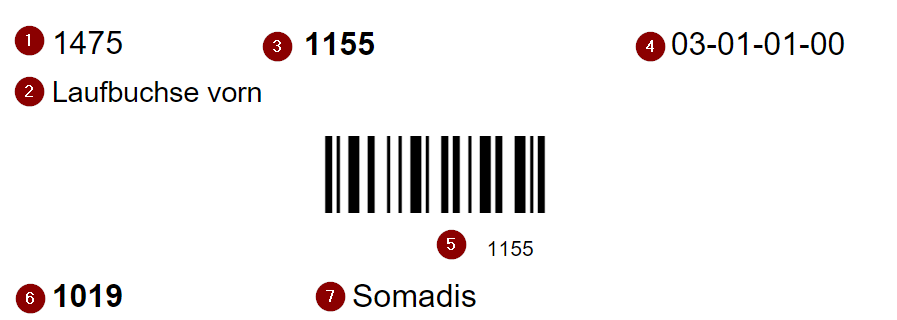
- Number of pieces
- Item description
- Item no.
- Storage place of the item
- Barcode and item no.
- Source no.
- Customer/vendor name
Picking Storage Place Label
This label is used to identify fixed picking storage places.
- Dimensions: 90x33mm

It consists of
- Item description
- Item name
- Barcode
- Storage Place no.