GS1-SSCC Setup
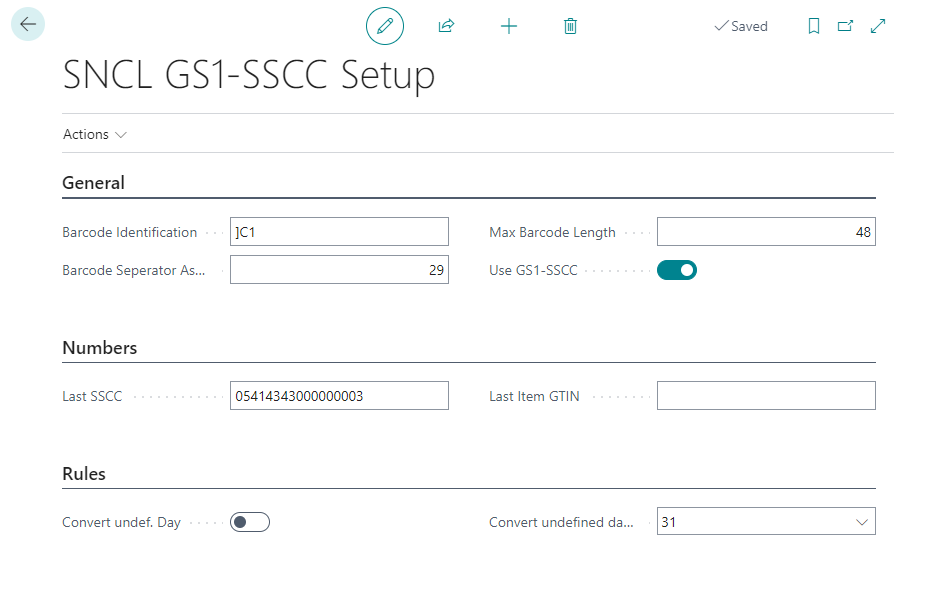
This page can be used to setup GS1 barcode identification. The setup options also include the identifiers, ISO country codes and field assignments. These are already pre-filled according to the GS1 standard. Please only change them if special requirements make this necessary.
Hinweis
When working with GS1 and using non-base units of measure, please refer to the Notes on GS1 and Non-Base Units of Measure.
Actions
Setup
- EAN128 Identifiers
- Customer/Vendor Identifier
- EAN Identifier Field Assigning
- ISO Codes: Opens a page where you can define ISO codes for countries
Functions
- XMLport EAN identifier import: Imports/exports an XML file containing a list of all data identifiers defined on the GS1 SSCC Data Identifiers page.
- XMLport ISO Codes Import Export: Imports or exports an XML file containing ISO codes for countries
- Import/Export field assignments: Imports or exports an XML file containing the field mappings from the GS1-SSCC DB Field Mappings page
General
- Barcode identification: Specifies the character string with which GS1 barcodes are identified
- Barcode separator Ascii value: Defines the ascii value that separates the barcode parts from each other
- Max Barcode length: Defines the maximum barcode length that SIEVERS WMS should accept
- Use GS1 SSCC: Activating this option enables GS1 barcode recognition
Numbers
- Last SSCC
- Last item GTIN
Rules
- Convert undef. Day
- Convert undef. Day to
GS1-SSCC Identifiers
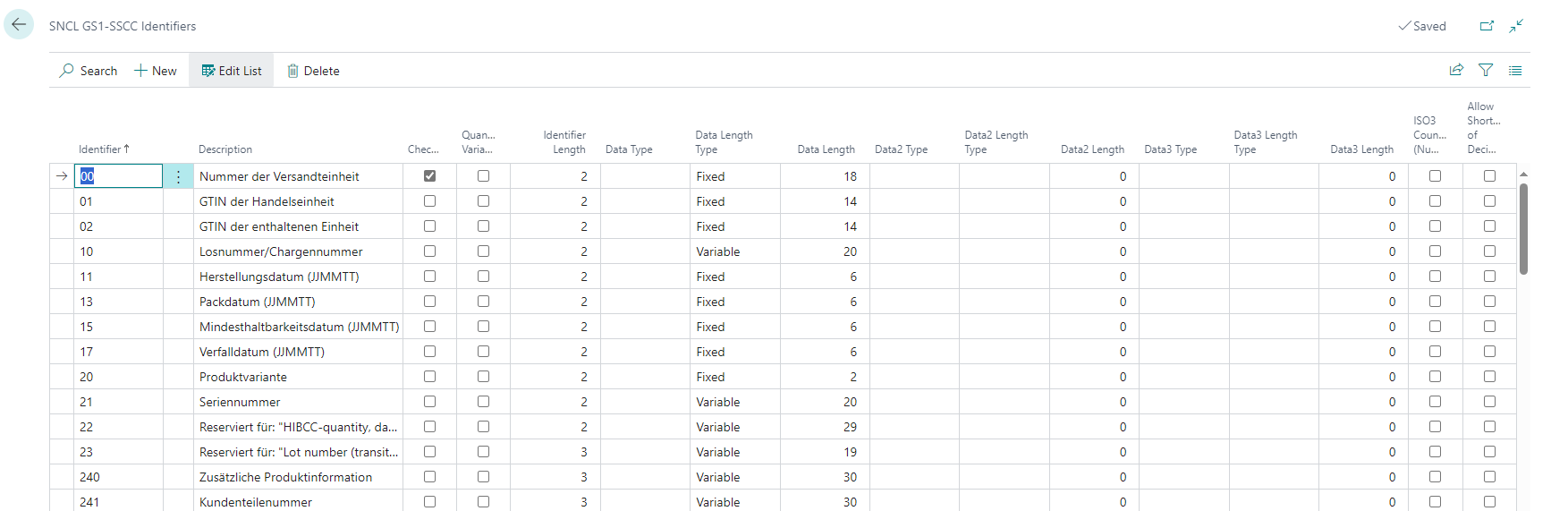
- Identifier: Defines the data identifier number
- Description: Names the data identifier
- Checkdigit
- Quantity variable
- Identifier Length
- Data/2/3 type
- Data2/3 length type
- Data2/3 length
- ISO3 country code (number): Insert an ISO3 country code if this description is country-specific.
- Allow shortening of the decimal number
- GS1 Label Support: In the table Customer/Vendor Identifiers, the fields GS1 SSCC and Code128 provide the option to print the respective identifier on a GS1 SSCC label. However, this is not yet possible for all identifiers. The reason for this is the high development effort, which is being worked through gradually. To make it easier to identify which identifiers can already be printed, this information field exists.
Customer/Vendor Identifier
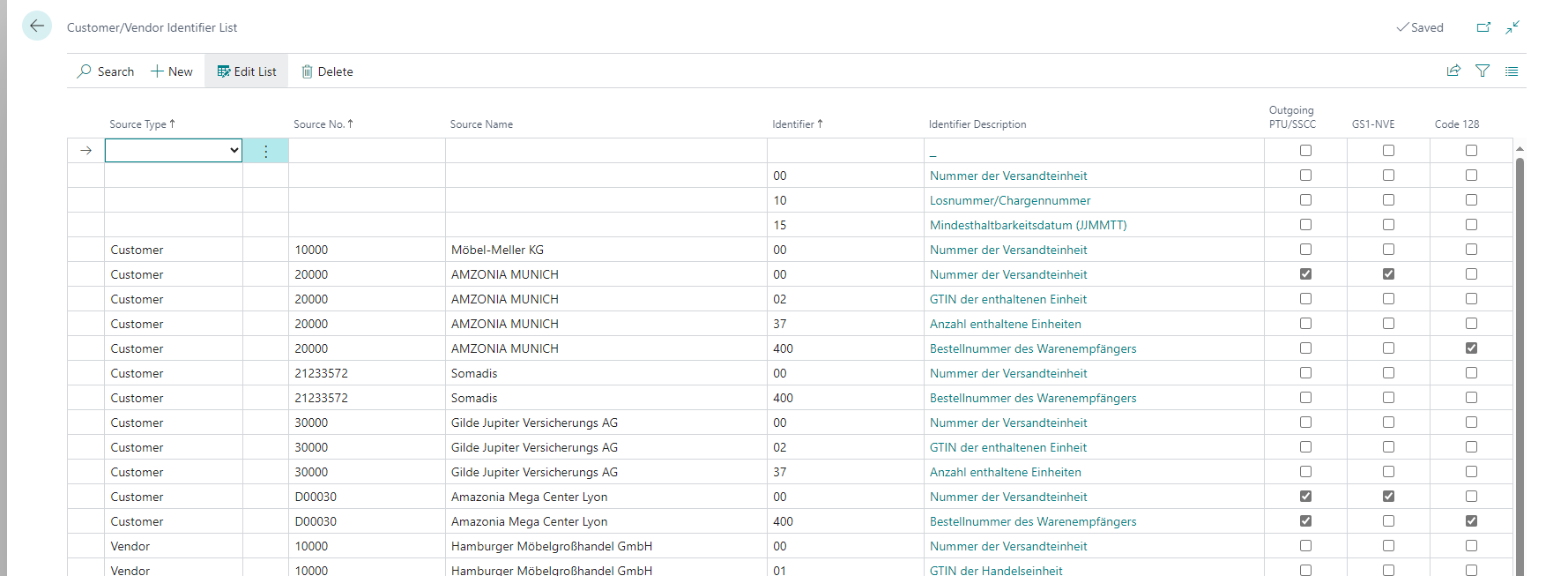
In this list, you can define the specific descriptions that your customers and vendors use in the GS1 barcodes. The combinations defined here are mandatory fields in warehouse receipt or warehouse shipment. If no specific vendor or customer is entered in the line, this setup line will be utilized for all vendors and customers except those defined here.
When using GS1 with non-base units of measure, please refer to the Notes on GS1 and Non-Base Units of Measure.
- Source type: Either both (empty field), customer or vendor
- Source no.: Enter a customer or vendor number here.
- Source name: Name of the customer or vendor
- Identifier: Enter an identifier number here
- Identifier description: Description of the identifier
- Outgoing PTU / SSCC: Indicates whether a different label such as the Amazon GS1 label is to be used for the sales order
- GS1-SSCC / Code 128: You can use these radio buttons to select which type of barcode should be generated when creating a PTU/SSCC. You can only select one of the two options. If you do not select an option, a barcode is created according to Code 128
The identifiers are defined to GS1-SSCC identifier.
GS1-SSCC Identifier-Field-Assign
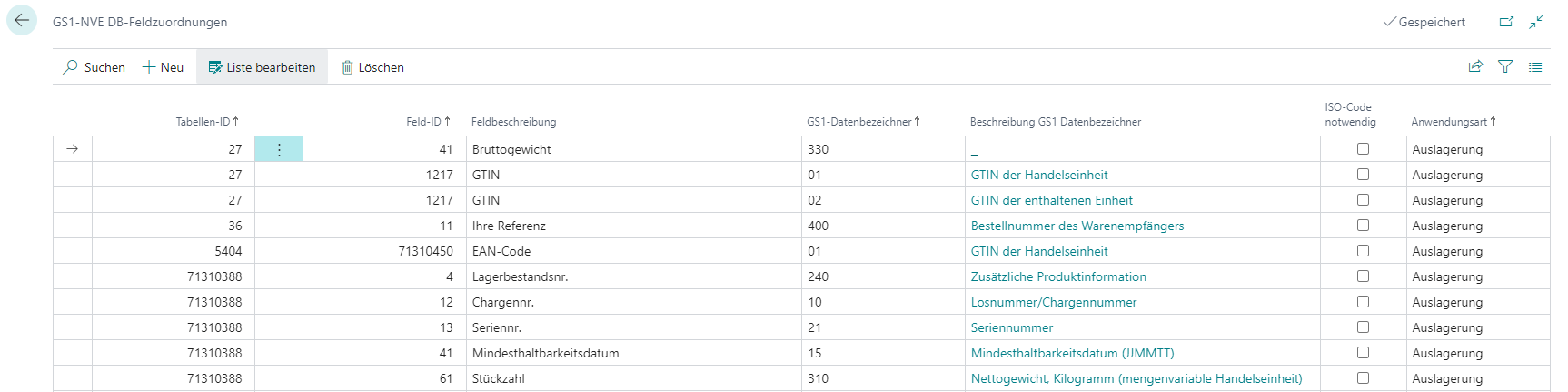
This page is used to assign GS1 descriptions and SIEVERS WMS fields to each other. This means that you can specify which identifier from the GS1 SSCC identifier page is to be utilized for which field in the warehouse receipt or shipments process.
- Table ID: Enter the table ID from which you require the field ID.
- Field ID: Enter the field ID.
- Field description: Describes the field
- GS1 identifier: Insert one of the identifiers defined on GS1-SSCC identifier
- Description GS1 identifier: Describes the identifier
- ISO code necessary: Activate this option if this field identifier combination is country-specific.
- Application type: Select between Inbound Stock Post, Outbound Stock Post and Warehouse Receipt
Hinweis
Identifiers that do not match any field assignment in this table when processing a GS1 barcode are silently skipped. Mandatory field checks remain unaffected.
Notes on GS1 and Non-Base Units of Measure
SIEVERS WMS supports processing of GS1 SSCC barcodes in warehouse receipt even when the warehouse receipt line uses a different unit of measure than the item's base unit of measure. The quantity conversion to the base unit of measure is performed automatically.
Hinweis
Important Notes When Using Non-Base Units of Measure with GS1:
When both deviating units of measure from the item's base unit of measure are used in the purchase order and GS1 barcodes are being processed, what is stored in the item references takes precedence - the combination of GTIN and unit of measure.
GS1 Conformity: When packaging units are managed as trade units, they have their own GTIN, which must be identified with Application Identifier 01 (without AI 37). If only one GTIN is used, it should always be used with the base unit of measure.
Different units of measure in purchasing and warehouse lead to increased workload in warehouse receipt. Their utilization should be carefully considered.