Keyword index
Abbreviations
| Wort de |
Abkürzung de |
Word en |
Abkürzung en |
| Lagereinheit |
LE |
Storage Unit |
SU |
| Kommissionierter Ladungsträger |
KLT |
Picking Transport Unit |
PTU |
| Nummer Versandeinheit |
NVE |
Serial Shipment Container Code |
SSCC |
| Unterverpackungseinheit |
UVE |
Subpackaging Unit |
SPU |
| Mobiles Datenerfassung |
MDE |
Mobile Data Collection |
|
| Mengeneinheit |
MEH |
|
|
| Serienladungsträger |
SLT |
Series Transport Unit |
STU |
| Für die Produktionsentnahme ausgewählter Ladungsträger |
PLT |
Load carrier selected for production take out |
PLC |
|
|
|
|
| Icon |
Function |
 |
Cancel New Inventory |
 |
Update |
 |
Change View |
 |
Print Item Label |
 |
Item Transfer |
 |
Pack Items Individually |
 |
Recorded SSCC |
 |
Information |
 |
Unpack |
 |
Back |
 |
Document Entry |
 |
Inventory Difference |
 |
Post |
 |
Print Inventory Label |
 |
Enter |
 |
Driving Order Filter |
 |
Photo |
 |
Function |
 |
Open Function Menu / Switch Tab |
 |
Reset Checked |
 |
Change Counted Value |
 |
Main Menu |
 |
Info |
 |
Internal Transports |
 |
Create Load Carrier |
 |
Confirm Empty Storage Place |
 |
Reprint SU Label |
 |
Print Load Carrier Label |
 |
Dimensions and Weight |
 |
Close Menu Page |
 |
New Inventory |
 |
Record New Inventory |
 |
New Picking Place |
 |
New Process |
 |
New Destination |
 |
Deactivate SSCC |
 |
SSCC Inquiry |
|
Delete Serial Number |
 |
Keyboard |
 |
Unload TU |
 |
Apply |
 |
Complete Loading |
 |
Warehouse Receipt Filter |
 |
Remove Assignment |
State
States in Warehouse Receipt
The following states exist in the warehouse receipt:
| State |
Meaning |
| 0-Notified |
The warehouse receipt has been created. |
| 1-Recorded |
The Blanco Barcode in the Warehouse Receipt Header is entered. |
| 2-Released MDE |
The warehouse receipt has been released for the MDE. |
| 3-Clearing QS |
The warehouse receipt must be sent to quality assurance and has been set to 3-Clearing QS. This starts the time recording of the process - visible in "Home Clearing QS". |
| 4-Clearing EK |
The warehouse receipt has been set to 4-Clearing EK. This starts the time recording of the process - visible in "Home Clearing EK". |
Combinations of warehouse receipt and load carrier states
If the status of the warehouse receipt is changed, this also has an effect on the status of the load carriers. The respective status combinations are listed in the following table.
| Case |
|
WHS Receipt state old |
WHS Receipt state new |
Change |
Restriction |
| 1 |
WHS Receipt |
0-Notified |
1-Recorded |
Manual |
|
|
SU |
0-Notified |
1-Receipt Processing |
System |
|
|
PTU |
0-Notified |
1-Receipt Processing |
System |
|
|
SSCC |
0-Notified |
1-Receipt Processing |
System |
|
|
SPU |
0-Notified |
1-Receipt Processing |
System |
|
| 2 |
WHS Receipt |
1-Recorded |
0-Notified |
Manual |
|
|
SU |
1-Receipt Processing |
0-Notified |
System |
|
|
PTU |
1-Receipt Processing |
0-Notified |
System |
|
|
SSCC |
1-Receipt Processing |
0-Notified |
System |
|
|
SPU |
1-Receipt Processing |
0-Notified |
System |
|
| 3 |
WHS Receipt |
1-Recorded |
3-Clearing QA |
manual |
|
|
SU |
1-Receipt Processing |
3-Clearing QA |
System |
|
|
PTU |
1-Receipt Processing |
3-Clearing QA |
System |
|
|
SSCC |
1-Receipt Processing |
3-Clearing QA |
System |
|
|
SPU |
1-Receipt Processing |
3-Clearing QA |
System |
|
| 4 |
WHS Receipt |
1-Recorded |
4-Clearing Purch. |
manual |
|
|
SU |
1-Receipt Processing |
4-Clearing Receipt |
System |
|
|
PTU |
1-Receipt Processing |
4-Clearing Receipt |
System |
|
|
SSCC |
1-Receipt Processing |
4-Clearing Receipt |
System |
|
|
SPU |
1-Receipt Processing |
4-Clearing Receipt |
System |
|
| 5 |
WHS Receipt |
1-Recorded |
2-Released Mobile Device |
Manual |
|
|
SU |
1-Receipt Processing |
1-Receipt Processing |
without |
|
|
PTU |
1-Receipt Processing |
1-Receipt Processing |
without |
|
|
SSCC |
1-Receipt Processing |
1-Receipt Processing |
without |
|
|
SPU |
1-Receipt Processing |
1-Receipt Processing |
without |
|
| 6 |
WHS Receipt |
1-Recorded |
5-Posted |
System |
|
|
SU |
1-Receipt Processing |
2-Recorded |
System |
|
|
PTU |
1-Receipt Processing |
2-Recorded |
System |
|
|
SSCC |
1-Receipt Processing |
7-Ready for dispatch, 2-Recorded |
System |
|
|
SPU |
1-Receipt Processing |
2-recorded, 7-packed |
System |
|
| 7 |
WHS Receipt |
2-Released Mobile Device |
5-Posted |
System |
|
|
SU |
1-Receipt Processing |
2-Recorded |
System |
|
|
PTU |
1-Receipt Processing |
2-Recorded |
System |
|
|
SSCC |
1-Receipt Processing |
7-Ready for dispatch, 2-Recorded |
System |
|
|
SPU |
1-Receipt Processing |
2-recorded, 7-packed |
System |
|
| 8 |
WHS Receipt |
2-Released Mobile Device |
1-Recorded |
manual |
if not processed |
|
SU |
1-Receipt Processing |
1-Receipt Processing |
without |
|
|
PTU |
1-Receipt Processing |
1-Receipt Processing |
without |
|
|
SSCC |
1-Receipt Processing |
1-Receipt Processing |
without |
|
|
SPU |
1-Receipt Processing |
1-Receipt Processing |
without |
|
| 9 |
WHS Receipt |
3-Clearing QA |
1-Recorded |
manual |
|
|
SU |
3-Clearing QA |
1-Receipt Processing |
System |
|
|
PTU |
3-Clearing QA |
1-Receipt Processing |
System |
|
|
SSCC |
3-Clearing QA |
1-Receipt Processing |
System |
|
|
SPU |
3-Clearing QA |
1-Receipt Processing |
System |
|
| 10 |
WHS Receipt |
4-Clearing Purch. |
1-Recorded |
manual |
|
|
SU |
4-Clearing Receipt |
1-Receipt Processing |
System |
|
|
PTU |
4-Clearing Receipt |
1-Receipt Processing |
System |
|
|
SSCC |
4-Clearing Receipt |
1-Receipt Processing |
System |
|
|
SPU |
4-Clearing Receipt |
1-Receipt Processing |
System |
|
| 11 |
WHS Receipt |
5-Posted |
./. |
Return / WHS Receipt Cancellation |
Not sent |
Adjustment of the load carriers in the inventory via reversal
State of the Load Carrier
Storage Unit (SU)
| ID |
State |
Meaning |
| 0 |
Notified |
The load carrier has not yet arrived at the warehouse. It has been announced for delivery. |
| 1 |
Receipt Processing |
The load carrier is blocked due to progress in warehouse receipt. |
| 2 |
Recorded |
The load carrier is available for further processing and is in the warehouse. |
| 3 |
Clearing QA |
For quality inspection or clarification in quality assurance. |
| 4 |
Clearing Receipt |
For clarification in purchasing or warehouse receipt. |
| 9 |
Done Sent |
No further internal handling is required for this load carrier; the internal process is considered completed. |
Picking Transport Unit (PTU)
| ID |
State |
Meaning |
| 0 |
Notified |
The load carrier has not yet arrived at the warehouse. It has been announced for delivery. |
| 1 |
Receipt Processing |
The load carrier is blocked due to progress in warehouse receipt. |
| 2 |
Recorded |
The load carrier is available for further processing and is in the warehouse. |
| 3 |
Clearing QA |
For quality inspection or clarification in quality assurance. |
| 4 |
Clearing Receipt |
For clarification in purchasing or warehouse receipt. |
| 5 |
Pick Processing |
The load carrier is blocked by picking – it is in the picking process. |
| 6 |
In Packaging Process |
The load carrier is blocked by packaging – it is being processed in packaging. In the MOP process, this state is already set when removing individual PTUs from the rack, not only when completing the entire batch. |
| 7 |
Packed |
The load carrier is ready for loading; waiting to be loaded onto a truck, Load Carrier or transporter. |
| 8 |
Loaded |
The load carrier has been loaded onto a truck, CTR or transporter (but may still be in the storage area). |
| 9 |
Done Sent |
The PTU has been processed and converted to an SSCC. |
Serial Shipment Load Carrier Code (SSCC)
| ID |
State |
Meaning |
| 0 |
Notified |
The load carrier has not yet arrived at the warehouse. It has been announced for delivery. |
| 1 |
Receipt Processing |
The load carrier is blocked due to progress in warehouse receipt. |
| 2 |
Recorded |
The load carrier is available for further processing and is in the warehouse. |
| 3 |
Clearing QA |
For quality inspection or clarification in quality assurance. |
| 4 |
Clearing Receipt |
For clarification in purchasing or warehouse receipt. |
| 5 |
Pick Processing |
The load carrier is blocked by picking – it is in the picking process. |
| 6 |
In Packaging Process |
The load carrier is blocked by packaging – it is being processed in packaging. |
| 7 |
Packed |
The load carrier is ready for loading; waiting to be loaded onto a truck, Load Carrier or transporter. |
| 8 |
Loaded |
The load carrier has been loaded onto a truck, CTR, or transporter. The load unit is still in the storage area (e.g. ramp). |
| 9 |
Done Sent |
The load carrier has been delivered. It has left the storage area and is on its way to the customer. |
Subpackaging Unit (SPU)
| ID |
State |
Meaning |
| 0 |
Notified |
The load carrier has not yet arrived at the warehouse. It has been announced for delivery. |
| 1 |
Receipt Processing |
The load carrier is blocked due to progress in warehouse receipt. |
| 2 |
Recorded |
The load carrier is available for further processing and is in the warehouse. |
| 4 |
Clearing Receipt |
For clarification in purchasing or warehouse receipt. |
| 5 |
Pick Processing |
The load carrier is blocked by picking – it is in the picking process. |
| 6 |
In Packaging Process |
The load carrier is blocked by packaging – it is being processed in packaging. |
| 7 |
Packed |
The load carrier is ready for loading; waiting to be loaded onto a truck, Load Carrier or transporter. |
| 8 |
Loaded |
The load carrier has been loaded onto a truck, CTR or transporter, but may still be within the warehouse area (e.g. staging zone). |
| 9 |
Done Sent |
The load carrier has left the warehouse. It is on its way to the customer, and no further internal handling is needed. |
State of the warehouse receipt
| State |
Meaning |
| 0- Notified |
The warehouse receipt is planned but has not yet arrived at the plant. |
| 1- Recorded |
The warehouse receipt has been created and a Blanco Barcode has been scanned. |
| 2- Released Mobile Device |
The warehouse receipt has been released by MDE. |
| 3- Clearing QA |
The warehouse receipt is in quality assurance and has been set to 3-Clearing QA. This starts the time recording of the process - visible in "Home Clearing QS". |
| 4- Clearing Purch. |
The warehouse receipt has been set to 4-Clearing EK. This starts the time recording of the process - visible in "Home Clearing EK". |
| 5- Posted |
The warehouse receipt has been posted. |
Hinweis
If the state is 0-Notified, 3-Clearing QA or 4-Clearing Purch., the warehouse receipt cannot be posted. If the state is 1-Recorded or 2-Released Mobile Device, the warehouse receipt can be posted. With 2-Released Mobile Device only via the MDE application, with 1-Recorded via Business Central and the MDE application.
Warehouse Shipment Planning State
The status indicators in the Warehouse Shipment Planning show the processing state for the areas Warehouse, Availability, Picking, Packing, and Loading. Each indicator reflects the worst status from all associated order lines. This means that as soon as a single line at a lower level has an unfavorable status, it is aggregated upward to the warehouse shipment level.
The Partial Delivery field is set when not all warehouse shipment lines are included in the warehouse document, for example due to insufficient stock. It signals a missing part and usually requires coordination with purchasing.
Tipp
The status indicators can be used as work filters: for example, all warehouse shipments with missing parts (Partial Delivery = Yes), all work queues still to be released (Picking = Open), or all shipments ready for loading (Packing = Finished). Use the Warehouse Shipment Planning filters for this purpose.
| Availability |
Picking |
Packing |
Loading |
|
|
| Open (red) |
There is at least one item that needs to be released or printed for the picking or packing process. |
At least one item contained cannot be covered by existing inventory. |
No item has yet been released for picking. |
No item has yet been released for packaging. |
The shipment process has not yet started. |
| Created (yellow) |
|
|
Picking has been created and quantities have been reserved. There are no items in picking yet. |
|
|
| Partially available (yellow) |
|
Shipping advice is set to “partial” and there are available and unavailable items. |
|
|
|
| Partially released (yellow) |
Either picking or packaging is still partially released |
|
Picking is partially released if only some of the items are being picked. |
Some of the items are in packaging. |
Only some of the assigned loadings are released. |
| Released (yellow) |
All contained items are released or printed for further progress for picking and / or packaging. |
|
Each item has been released or printed for picking. |
Each item has been released or printed for packing. |
The warehouse shipment has been released for loading. |
| Available/Finished (green) |
All items in picking and packaging processing have been processed. The warehouse shipment is ready for loading or posting. |
All lines can be released or printed. |
|
All contained items have been picked in the warehouses. |
All contained items have been packed directly in the picking or packing area. The loading process has been completed. |
Status Picking
| State |
Meaning |
| 0-created |
SNCL Outbound Stock Post has been created, reservations have been made - but picking has not yet been released or printed. |
| 1-printed |
The pick list has been printed. Re-printing should be avoided if possible, otherwise double picking may occur. |
| 2-released |
The pick list has been released on an MDE and can be edited. |
| 3-in progress |
The picking process has already been partially processed and has not yet been completed. |
| 8-Canceled |
All positions have been canceled |
| 9-finished |
All items have been picked. This state can also be assigned directly if only PTUs or SSCCs that have already been packed were entered when the Outbound Stock Post was created. |
Status Picking Positions
The status of the pick document lines is independent of the status of the picking. The status of the lines is dynamically adjusted depending on the processing step.
| Status |
Meaning |
| 0- Created |
SNCL Outbound Stock Post is created, reservations made - but the picking has not yet been released or printed. |
| 2- Printed |
The pick list has been printed. Reprinting should be avoided if possible, as this may result in double picking. |
| 2- Released |
The pick list has been released on an MDE and can be processed. If the position is processed or the line is reported back, the line remains at this status. |
| 3- In Processing |
A user has selected this position on the MDE. Remains set until the position is reported back. |
| 8- Canceled |
The position has been canceled. |
| 9- Finished |
The position has been completely picked and reported back. |
State of the loading list
If the shipping agent does not require loading, the loading status indicator in the warehouse shipment planning remains empty.
| State |
Meaning |
| 1-Printed |
The loading list has been printed. This state can only be set after the previous state was 0-created |
| 2-Released for preparation |
The loading has been released for preparation. The load carriers cannot be loaded in this status. |
| 3-Released |
The loading has been released. |
| 7-Loading Processing |
The loading process is in Loading Processing. Is set when the first SSCC has been assigned to the truck / CTR at the MDE. |
| 8-Loaded |
All SSCCs are loaded. |
| 9-Finished |
The loading has been checked |
State of the Series Picking
| State |
Meaning |
| 0- Created |
When creating the series with deactivated automatic release in the series creation strategy |
| 1- Released |
Manually or automatically released |
| 2- In Progress |
First picking document printed or first picking process selected on MDE |
| 3- Picked |
The items have been picked |
| 4- Finished |
All items in a series have been picked and posted back to PTUs |
| 5- Clarification |
A shortage has been detected and no alternative stock has been found. |
State of the Cycle Counting
| State |
Meaning |
| 0- Open |
Manually set state for 1st and 2nd count if no progress is to be made at the MDE. Initial status for 3rd count |
| 1- Printed |
Cycle counting list has been printed for progress |
| 2- Released |
Initial status for 1st and 2nd count |
| 3- In progress |
As soon as an inventory has been counted |
| 4- Counted |
As soon as everything has been counted |
| 8- Deleted/Discarded |
Cycle counting list was discarded, e.g. if the last count value was manually accepted before another count was carried out |
| 9- Finished |
Cycle counting list was transferred to the stocktaking |
State Replenishment in Production Supply
| State |
Color |
Meaning |
Action Required |
| Open |
Red |
No or insufficient replenishment move jobs available. Quantity remaining exceeds finished and considered replenishment quantities. |
Replenishment must be created |
| Created |
Yellow |
Replenishment move job has been created, but processing has not yet started. |
Move job must be released/started |
| In Progress |
Yellow |
Replenishment move job is currently being processed (e.g., goods loaded onto forklift, picking is in progress, employee assigned). |
Wait until replenishment is completed |
| Available |
Green |
All required components are available. Quantity remaining is covered by finished and considered replenishment quantities. |
No action required |
State of MOP Batches
MOP batches go through the following states:
| State |
Description |
Possible Actions |
| 0-Created |
Batch has been created but not yet released |
Release, Delete, Edit |
| 1-Released |
Batch has been released, pick documents have been created |
Reset state, Start picking |
| 2-In Progress |
At least one pick document has been printed or selected on the MDE |
Continue picking |
| 3-Picked |
All items have been picked |
Start packing |
| 4-Finished |
All orders have been fully processed and packed |
Archive |
| 5-Clarification |
Short quantity found or problem occurred |
Manual review required |
Hinweis
The state changes automatically based on the progress of the picking. You can reset the state manually via the Reset State action in the MOP Monitor (only from state 1-Released to 0-Created).
Warehouse Shipment Planning State
The status indicators in Warehouse Shipment Planning show the processing state for the areas Stock, Availability, Picking, Packaging, and Loading. Each indicator reflects the worst status from all associated order lines. As soon as a single line at a lower level has an unfavorable status, it is aggregated upward to the warehouse shipment level.
The field Partial Delivery is set when not all shipment lines are included in the warehouse document, for example due to insufficient stock. It signals a shortage and typically requires coordination with purchasing.
Tipp
The status indicators can be used as work filters: for example, all warehouse shipments with shortages (Partial Delivery = Yes), all work queues still to be released (Picking = Open), or all shipments ready for loading (Packaging = Finished). Use the Warehouse Shipment Planning filters for this.
|
Stock |
Availability |
Picking |
Packaging |
Loading |
| Open (red) |
At least one line that needs to be released or printed for picking or packaging. |
At least one line cannot be covered by available stock. |
No line has been released for picking yet. |
No line has been released for packaging yet. |
The loading process has not yet started. |
| Created (yellow) |
|
|
The picking document has been created and quantities reserved, but no items are in picking yet. |
|
|
| Partially available (yellow) |
|
Shipping advice is set to “Partial delivery” and there are both available and unavailable lines. |
|
|
|
| Partially released (yellow) |
Either picking or packaging is still partially released. |
|
Only some lines are in picking. |
Some lines are in packaging. |
Only some of the assigned loading processes are released. |
| Released (yellow) |
All lines are released or printed for picking and/or packaging. |
|
Every line is released or printed for picking. |
Every line is released or printed for packaging. |
The warehouse shipment has been released for loading. |
| Available/Finished (green) |
All lines in picking and packaging are processed. The warehouse shipment is ready for loading or posting. |
All lines can be released or printed. |
All lines have been picked. |
All lines have been packed (directly in picking or packaging). |
The loading process is complete. |
Picking Document Status
| Status |
Meaning |
| 0-Created |
Outbound stock post created, reservations made – picking not yet released or printed. |
| 1-Printed |
The picking document has been printed. Avoid reprinting to prevent duplicate picking. |
| 2-Released |
The picking document has been released on an MDE device and can be processed. |
| 3-In Progress |
Picking has been partially processed and not yet completed. |
| 8-Cancelled |
All lines have been cancelled. |
| 9-Finished |
All lines have been picked. This status can also be set directly when only already-packed PTUs or SSCCs were loaded during creation of the outbound stock post. |
Warehouse Shipment Dates
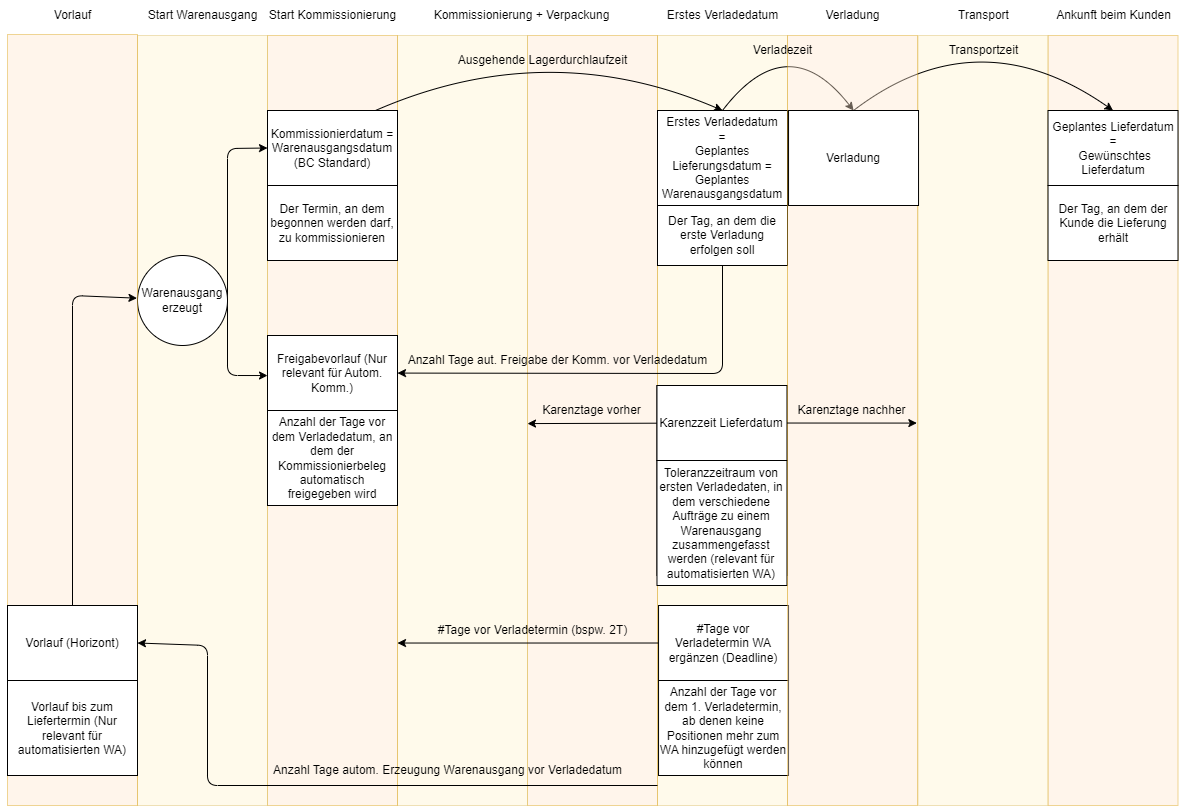
- Lead Time: Relevant for automated warehouse shipments and Outbound Stock Posts. Determines the point in time as to how far in advance of the loading date/delivery date a warehouse shipment or Outbound Stock Post may be created or added to an existing warehouse shipment. If this is set to 10D, the warehouse shipment or Outbound Stock Post is created 10 working days before the first loading date or planned shipment date.
- Release Lead Time: Number of days before the loading date from which the picking document is automatically released. Only relevant if the automatic picking document release is used.
- Priority 1: Release lead time in SIEVERS WMS Team: Order Types
- Priority 2: Release lead time in SIEVERS WMS Team: Picking & Packaging
- Picking Date: First Shipment Date - Outbound Warehouse Lead Time (from the storage location map). The date on which picking may commence.
- First Loading Date: Specifies the day on which the first loading can be expected. This is the date from which the rest of the Warehouse Shipment Planning is based.
- Grace Period Shipment Date: Tolerance period around the first loading date in which various orders are combined into a single warehouse shipment (relevant for automated warehouse shipment). Example: Grace period = 2 business days. The first loading date of a warehouse shipment is 9/27. The planned delivery date of an order is 9/28. This order is still within the grace period and is added. Another order has a planned delivery date of 9/24. This is outside the grace period and therefore cannot be added to the warehouse shipment. The working days are defined using the basic calendar code for the customer. If no calendar code is entered there, the basic calendar code for the storage location is used.
- #Days before 1st Load Date: The number of business days before the 1st load date from which no more line items can be added to the warehouse shipment.
- Promised Shipment Date: The day on which we promised the shipment.
- Planned Warehouse Shipment Date: The planned day of the first loading date. Calculated by Planned Delivery Date - Shipping Time.
- Planned Delivery Date: The day on which the customer should receive the shipment.
- Requested Delivery Date: The day on which the customer wants to receive the goods. If this field is filled, it is the basis for the planned delivery date.
- Delivery Date: The day of the first loading date
- Shipment Date: Arrival of the goods at the customer
- Outbound Warehouse Lead Time: Specifies for the Location Code how long the warehouse shipment takes from picking to the first shipment date
- Shipping Time:** Time between Shipment Date and Delivery Date. Shipping Time of the Items
- Priority 1: Shipping Time at Shipping Agent
- Priority 2: Shipping Time at Customer
- Work Date: The current day