Item
Many setup fields have been added to the item card of the Business Central standard.
- GTIN: Please note that the GTIN is automatically changed as soon as the base unit of the item is entered in the item reference items. In this case, the reference number is entered as the GTIN. If you delete the GTIN from this field, the corresponding entry in the item references will also be deleted.
Item Tracking
- Item Tracking Code: If you set an Item Tracking Code in the Item Card, the option Lot No. necessary in the SWMS Classifications will be automatically set to true. If item tracking with expiration calculation is used, the With sell-by date option is automatically set to Mandatory field.
SWMS Inbound Stock Post/Outbound Stock Post/Storage | Replenishment
SWMS Storage
- Location code
- Storage Area
- Warehouse code
- Storage Shelf Code
- Zone code
- Category code
SWMS Outbound Stock Post
- Storage area Picking
- Warehouse Picking
- Number of picking places: Shows the number of picking places assigned to this item. By clicking on the number, the places themselves are displayed and can also be managed. This field is not filled until the item has been assigned to a storage location and then updated with F5.
- Picking place
- Serialization requirement for Inventory: If this setting is activated, unique serialization numbers must be recorded during picking. This setting cannot be active at the same time as Serial No. Necessary. For more information: Serialization Inventory.
SWMS Inbound Stock Posts/Supplies
- Minimum inventory pick place
- Maximum inventory pick place: Specifies the maximum quantity to keep in the picking place or picking area. No further replenishment is created when this value is exceeded. This field cannot be used together with Number of inventory items for replenishment.
- Minimum replenishment quantity pick place
- Step Size Replenishment: With this field you can gradually increase the replenishment amount based on the demand. For example if the demand for replenishment is 3 and the step size = 10, then the replenishment quantity is 10. If the demand is 11 pieces, the replenishment quantity is 20. This ensures replenishment at the appropriate level of the sub-packaging unit (e.g. carton-by-carton replenishment). Please make sure that the step size is always below the maximum inventory pick place.
- Number of inventory items for replenishment: Specifies the number of inventories or load carriers to keep in the picking area through replenishment. This field cannot be used together with Maximum inventory pick place or Minimum replenishment quantity pick place. For process details, see Organise Replenishment.
Transactions Replenishment
- Number of Inventories in Picking Area: Calculated field that counts the number of inventories located in picking areas (places, areas, halls, etc.).
- Number of Pieces in Picking Area: Calculated field that counts the sum of the items located in picking areas (places, areas, halls, etc.).
- Quantity in Inbound Stock Post Picking Area: Calculated field showing the total of the items that are in open move orders with a picking area as their destination
- Quantity in Reservation Picking Area: Calculated field showing the total of the items that are in picking areas in reservations
SWMS Strategies and Transactions
SWMS Strategies
- Inbound Stock Post strategy
- Replenishment Strategy
- Inventory Selection Strategy
- Reservation method
SWMS Transactions
- Load Carrier code
- Number of inventories in stock
- Stock number of units
SWMS Classification and Units
SWMS Classifications
- Size range
- ABC code
- A/B/C fix: If this indicator is set, the ABC code is not reset when analyzing is not reset
- With sell-by date: This field is used to determine what role the sell-by date plays for this item. If this item is activated for item tracking with an sell-by date, this field is automatically set to mandatory. In this case, the sell-by date is also written to the item entries after posting in addition to the stock entries and inventories. If item tracking is switched off, the sell-by date is not written to the item entries.
- Without sell-by date: The sell-by date cannot be recorded
- Mandatory field: The sell-by date must be recorded
- Residual Term Whse. Receipt: Date formula. Calculates the sell-by date. In the SIEVERS WMS setup, the Reac. SBD Resi. Term Whse Rec. field is used to determine what happens if the remaining sell-by date is exceeded
- Residual Term Whse. Shipment: Calculates the sell-by date. In the SIEVERS WMS setup, the Reac. SBD Resi. Term Whse. Ship. field is used to determine what happens if the remaining sell-by date is exceeded
- Lot no. necessary: Specifies whether a lot no. must be assigned for the item. This option causes all WMS documents with this item to require a lot no.
- Serial no. necessary: Specifies whether a serial no. must be assigned to the item
- Empties no.: If empties are used, you can enter the corresponding number here
- Empties: Specifies whether this item is an empties item. See Empties management
- Blocking Code WR: Automatically transferred to the inbound stock post line when creating an inbound stock post from a SWMS warehouse receipt. The newly received inventory is directly assigned the blocking code entered here.
- Inventory Swap in a Load Carrier: Enables the swap of inventory within a load carrier. Please read the description in the SIEVERS WMS setup
- Merge Inventories with same Characteristics: When merging is enabled, the system checks during inbound stock posting to an existing load carrier whether an inventory with the same item (No., Variant, Lot, Sell-by Date, Serial No.) already exists. If so, the quantity is added to the existing inventory. Consolidation only occurs for inbound stock posts and move jobs, and only when the target load carrier has the load carrier type SU or no target load carrier is set (posting directly to a storage place). The field provides these values:
- Standard: Uses the value from the item category.
- Activated: Enables merging for the item.
- Deactivated: Disables merging for the item.
Units
- PU Unit of Measure
- Subpackaging Unit (SPU): Defines the standard subpackaging unit for this item. The subpackaging unit specifies the unit in which the inventory is placed on a load carrier. If this unit is not set, the picker must enter the quantities to be picked independently. The sub-packaging unit must exist in the packaging hierarchy before it can be selected here.
Size range
The size range can be used to assign a property to items that enables filtering in the SIEVERS WMS Teams. For example, items that must be picked up with a specific forklift can be marked.
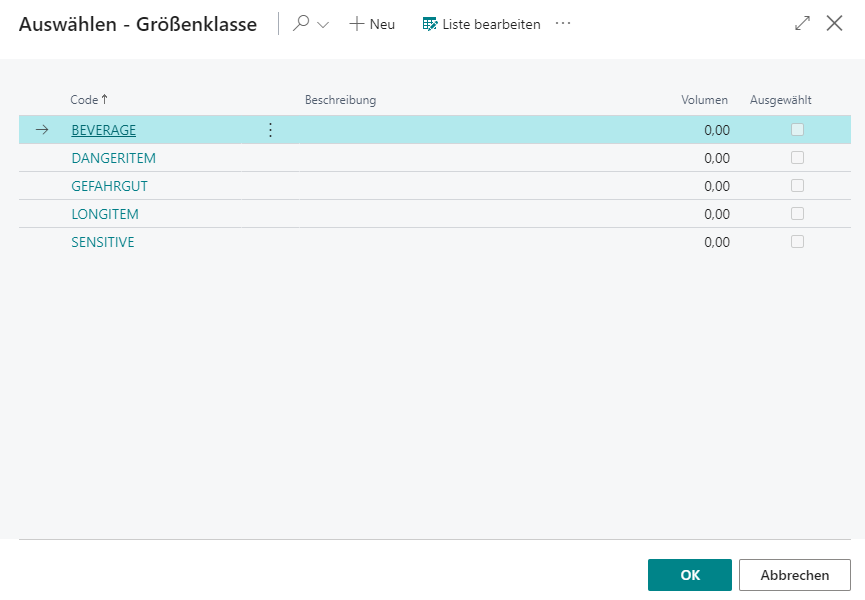
- Code
- Description of
- Volume
- Selected
SWMS Packaging Hierarchy
This table is intended to describe the packaging structure of the item. It has three key functions:
- Storage of inventory measures and dimensions of the smallest unit of measure
- Assignment of inventory measures to utilization
- Calculation of weight incl. packaging material in warehouse receipt
Hinweis
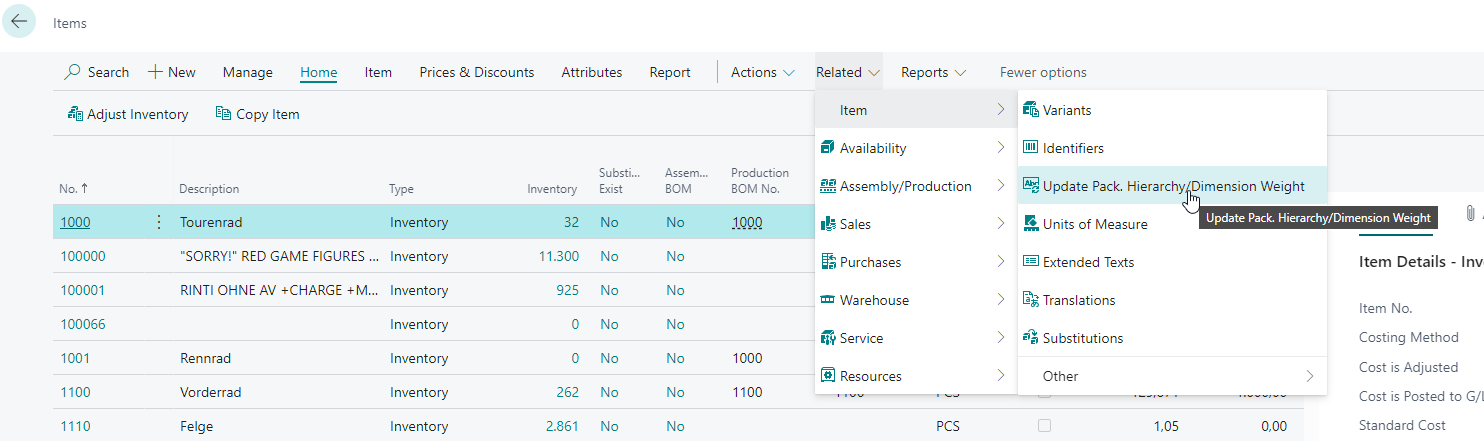
The weight of the smallest unit can also be generated automatically and synchronized with the weight of the smallest unit of measure of the item. Start the automatic synchronization by selecting Associated -> Items -> Update packaging hierarchy / dimension weight in the item list.
It is possible to set several sub-packaging units per item in the packaging hierarchy. A unique inventory unit of measure must be selected for each sub-packaging.
Please note the following information about synchronizing item units and packaging hierarchies:
- Item units can no longer be deleted once they are being used in the packaging hierarchy
- If the number of pieces per unit is changed in the item units, the field with the same name in the packaging hierarchy is updated
- If entries are deleted in the packaging hierarchy, these entries are also deleted in the item units
- If an item unit is created, it is not automatically entered in the packaging hierarchy
It contains the following information:
- Item no.
- Entry No.: Consecutive number
- Inventory Measure Code
- Quantity per Unit: Specifies the quantity in the base unit per packaging level. The field must be greater than 0. Entries with quantity 0 are rejected when leaving the line.
- Utilization: Each utilization with the exception of the information can only be used once per item
- Load carrier creation: If this utilization is selected, the data is transferred to new load carriers when they are created. If there is no entry with this utilization, the Default inventory measure from the WMS setup is used when creating new load carriers.
- Inventory creation: This data is transferred when inventory items are created
- Information: Only serves as information, no function
- Sub-packaging unit (SPU): Utilized in the Packaging process and Picking document reports to determine the remaining quantity
- Creation Transport Load Carrier system (SPU): Transport Load Carrier Creation Template
- Smallest storage unit: Defines the smallest possible storage unit
- Depth
- Width
- Height
- Gross weight
- Net weight
- GTIN
- GTIN relevant
The units of measurement from the base unit of measure list are also used for the respective dimensions and weights.
Hinweis
If Serial no. necessary is activated in the item area, the number of pieces per unit is automatically set to 1 when Inventory creation is utilized. If there is no such row in the packaging hierarchy table at the time the serial number requirement is activated, it will be created automatically.
If you create a row with the utilization carrier creation, an inventory creation row with the same number of pieces per unit of measure is automatically created.
The serial number requirement has no influence on the number of load carriers created during warehouse receipt. Load carrier creation follows the packaging hierarchy rules and user input regardless of the serial number requirement – identical to regular items. Multiple serial numbers can therefore be located on a single load carrier.
SWMS Assembly & Manufacturing Supply
- Location Code Production
- Supply Class Production
- Providing production
- Number of Production Places Production
- Production Place: Displays the production provision place. If multiple production places are set up, the numerically smallest one is displayed.
- Provisioning Strategy Code Components
- Replenishment Strategy Code Components: indicates the replenishment strategy to be used for production replenishments.
- Inv. Selection Strategy Code Components: indicates the inventory selection strategy to be used for production
- Number of Production Places Production
- Output Finished Product
- Inbound Stock Post Strategy Code Finished Products
- Storage Place Code Finished Products
- Production Quantity Specifications
- Minimum Inventory Production Place
- Maximum Inventory Production Place
- Step Size Production
- Minimum Replenishment Quantity Production
- Transactions Production: Provides current statistics for the item in production
- Number of Inventories in Production
- Number of Pieces in Production
- Quantity in Inbound Stock Post Production
- Quantity in Reservation Procution
SWMS Stock Account
- Inbound Stock Post Customer No.: If you enter a customer here, this item is henceforth declared as an outside storage item and can only be used as such
- Outbound Stock Post Customer No.: If you enter a customer here, this item is henceforth declared as an outside storage item and can only be used as such
- Inbound Stock Post Customer item no.: Specifies the customer-specific item number for inbound stock posting within stock account billing.
- Outbound Stock Post Customer item no.: Specifies the customer-specific item number for outbound stock posting within stock account billing.
- Storage charges code
- Inbound Stock Post code
- Outbound Stock Post code
- Picking charges code
- Stocktaking Charges Code
- Insurance value
- Insurance size of calculation
- Insurance factor of calculation
- Number of assortments: Shows the number of assortments to which the item is assigned.
- Production Item: Indicates whether the outside storage item may be used for production orders. Can only be activated if the item is marked as an outside storage item. When activated, the costing method is automatically set to "Standard", the unit cost (fix) is set to 0, and "Inventory Value Zero" is deactivated. These fields can then no longer be changed. Deactivation is only possible as long as no item entries or value entries exist for this item.
SWMS Dangerous Goods
- UN No.
- Classification Code: Specifies the Classification Code. The Classification Code characterizes the hazardous properties of a substance or object.
- Packaging Group: Specifies the Packaging Group. A packaging group combines dangerous goods of one hazard level. Substances with similar hazardous properties are assigned to a specific packing group.
- Packaging Code: Specifies the Packaging Code. This serves to differentiate packaging more precisely beyond the packaging group.
- Description
- n.a.g-Text: Specifies the n.a.g. text. This is used to designate dangerous goods not otherwise specified by name.
- Weight/Volume: Specifies the volume or weight. The unit is specified in the Unit of Mass field.
- Unit of Mass: Specifies which unit applies to the Weight/Volume field.
- Harzardous to Environment: Declares the substance as hazardous to the environment.
- Exemption
- Comment
- Net Explosive Mass
Customer
This area describes the individual setups relating to the customer.
SIEVERS WMS
- Inbound Stock Post Code
- Outbound Stock Post Code
- Activate Serialization Inventories in Warehouse Shipment: When this field is enabled, the quantity serialization mask is shown during picking for items that also have Serialization requirement for Inventory set. For more information: Serialization Inventory.
Over-Receipt Code
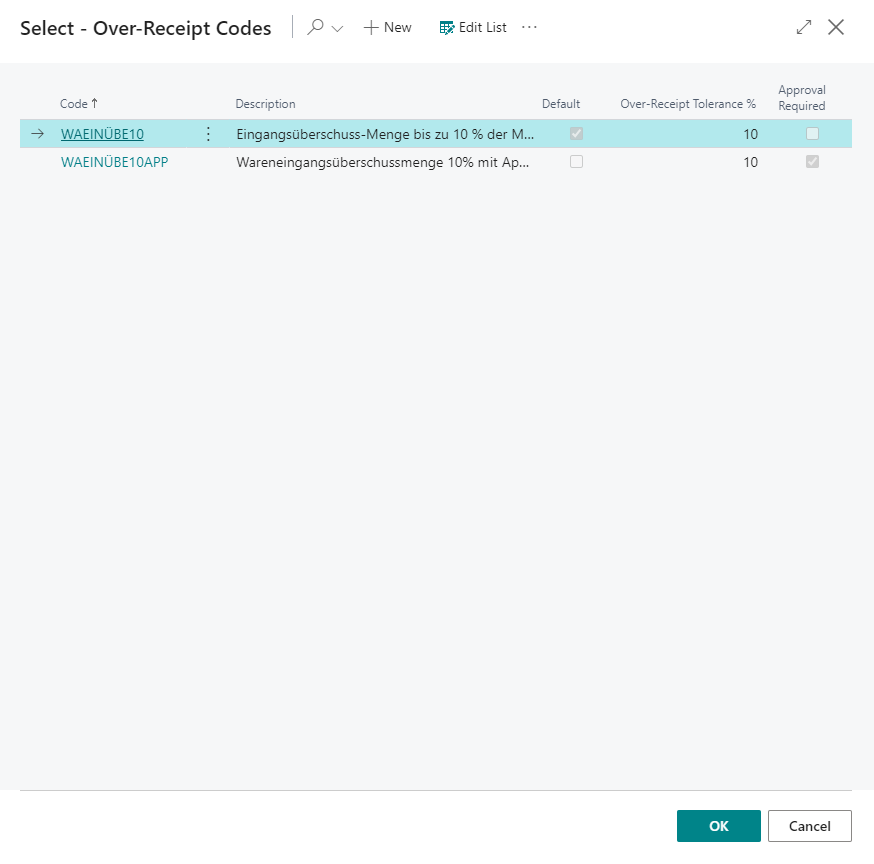
This setup is used to generate Over-Receipt codes that can be stored with the customer and in Inbound Stock Post orders. Over-Receipt codes are used to correctly process excess warehouse receipts that have not been ordered.
The setup contains the following fields:
- Code
- Code Description
- Default: Defines whether this code is used as the default
- Over-Receipt Tolerance %: Defines how much percentage overage there may be
- Approval required: Specifies whether Over-Receipt items with this Over-Receipt code must first be approved
If the Over-Receipt tolerance is exceeded in a document, an error message is displayed and the document cannot be posted.