SWMS Storage Places
This table shows all storage places entered in the system and their most important properties.
Hinweis
Create new storage places via the warehouse card.
Menu
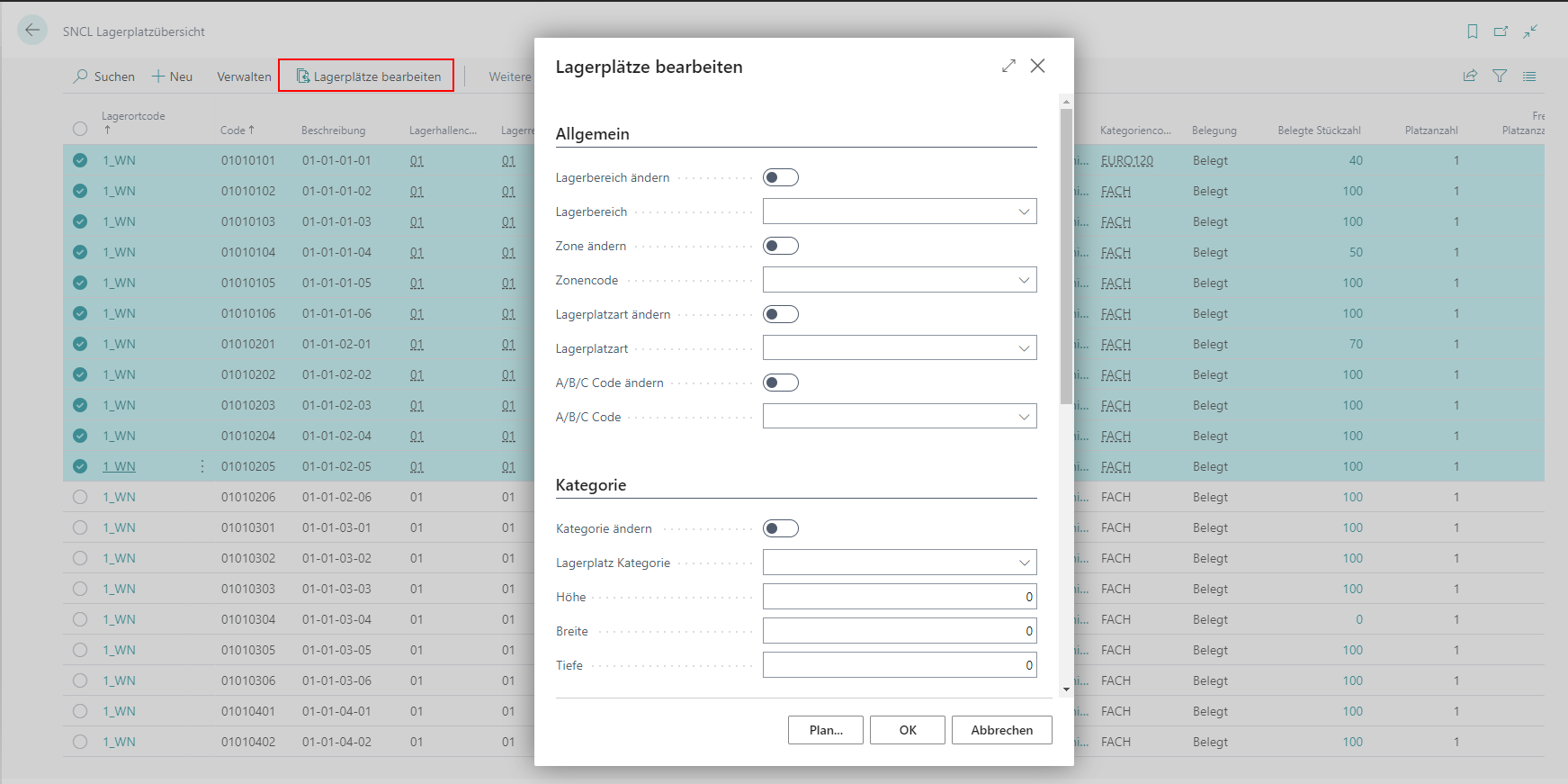
- Process Storage Places: This function allows you to customize any number of storage places at the same time. Use this function after you have selected one or more places. A window will then open in which you can change the attributes. Make sure that you always activate the corresponding [...] change field when changing an attribute. You have the following change options:
- Storage area
- Zone
- Storage place type
- Storage type
- A/B/C code
- Change Display Description MDE: If activated, the set option for Display Description MDE is applied to the storage places.
- Display Description MDE: Specifies if the Storage Place description should be used to display a Storage Place on MDEs. Howver, if this is activated, the functionalities to format the Storage Place display can not be used.
- Category
- Height/width/depth
- Blocking code
- Visibility for sales or production
- Delete places
- Start Manual storage place update: Updates the occupancy information of the selected storage places. The update includes not only the occupancy but also the values for weight, volume and no. of places from the assigned category.
- Storage without storage unit: Sets the Storage without storage unit field for all selected storage places. See SWMS Storage Place Card for details.
- Storing various inventories not allowed: Sets the Storing various inventories not allowed field for all selected storage places. See SWMS Storage Place Card for details.
- Rack Bays & Compartments (only with active Rack Compartment and Rack Bay Management):
- Change Rack Bay + Rack Bay Code
- Change Rack Compartment + Rack Compartment Code
- Change Rack Bay Type + Rack Bay Type
- Change Rack Compartment Type + Rack Compartment Type
Hinweis
The rack bay type and rack compartment type are not stored directly on the storage place, but on the assigned rack bay or rack compartment. The change therefore affects all storage places assigned to the same rack bay or rack compartment - not just the selected ones.
The types can only be changed if a rack bay or rack compartment code is assigned to the storage place. Removing a type is done by removing the rack bay or rack compartment code.
- Related
- Inventory
- Stock Entries
- Block Entry
- Picking Items
Table
- Location code
- Code
- Description
- Storage Place Type
- Warehouse code
- Storage Shelf Code
- Row code
- Level code
- Number of Inventories
- Number of different items
- Number of Inventories in SUs
- Number of Inventories in PTUs/SSCCs
- Occupied Number of pieces
- Number of Spaces by Category
- Available number of spaces
- Reserv. No. of Storage Places
- Reserv. Number of Units
- Category code
Rack Compartment and Bay Data (only with active Rack Compartment and Rack Bay Management):
Rack Compartment Code
Rack Compartment Type
Rack Compartment Type Description
Rack Bay Code
Rack Bay Type
Rack Bay Type Description
Current Max. Units: The maximum number of load carriers currently allowed in the rack compartment. Set automatically on the first storage operation and adjusted dynamically based on the unit assignments of the items placed in it. Reset to 0 when the compartment is emptied.
Number of Unit Assignments: Shows the current number of load carriers in the assigned rack compartment. The field is empty if no rack compartment is assigned to the storage place.
Rack Compartment Current Load
Rack Comp. Max. Load
Rack Bay Current Load
Rack Bay Max. Load
Occupancy
Rack Compartment Occupation (only with active Rack Compartment and Rack Bay Management)
Rack Bay Occupation (only with active Rack Compartment and Rack Bay Management)
Stocktaking No.
Last Stocktaking Date
Storage type
Function