Rack Compartment and Rack Bay Management
Rack Compartment and Rack Bay Management must first be activated in the SWMS Feature Setup. Once activated, the following tables and pages become available and are accessible directly via the SWMS menu ribbon in Business Central (below the storage zones).
Structural overview:
| Level | Structure | Purpose | Check |
|---|---|---|---|
| Rack Bay Type | Template entity | Default values for maximum bay load on rack bays | - |
| Rack Bay | Groups storage places across multiple levels | Monitoring of total bay load in high racks | Bay load check |
| Rack Compartment Type | Template entity (per location) | Default values for dimensions, compartment load, and inventory measure assignments | - |
| Rack Compartment | Groups storage places within a single level | Controls occupancy and compartment load per compartment | Compartment load check, max. number of load carriers |
| Storage Place | Lowest unit | References exactly one rack compartment and one rack bay | - |
The hierarchy flows top-down: A rack bay spans multiple rack compartments across different levels, and a rack compartment spans multiple storage places on the same level. Types (rack bay type, rack compartment type) allow centralized maintenance of default values that are automatically inherited when assigned to bays/compartments.
Rack Bay Types
Rack bay types provide default values for rack bay fields. The Rack Bay Types list page contains the following fields:
- Rack Bay Type Code: Unique code for the rack bay type.
- Description: Free-text description of the rack bay type.
- Maximum Bay Load [kg]: The maximum permissible load for rack bays of this type, with unit from the base unit of measure list.
The action Open Rack Bays opens the rack bays associated with this type.
Rack Bays
Rack bays group multiple storage places across levels under a shared code. In particularly high racks, they allow monitoring of the total bay load and prevent overloading of the rack.
SIEVERS WMS provides both a list and a card view for rack bays. The view contains the following fields:
- Location Code: Only WMS-managed locations can be used.
- Warehouse / Storage Shelf Code: Assignment of the rack bay to a warehouse and shelf.
- Rack Bay Code: Unique code for the rack bay.
- Description: Free-text description of the rack bay.
- Rack Bay Type / Rack Bay Type Description: Link to a rack bay type; the description is taken over automatically and is not editable.
- Maximum Bay Load [kg]: Maximum permissible load for the rack bay. Once this limit is reached, no more stock may be stored at the associated storage places.
- Rack Compartments: Number of assigned rack compartments.
- Number of Storage Places: Number of storage places with this rack bay code.
The Rack Bay Occupancy shows the current state of the rack bay:
- Free: None of the assigned storage places is occupied.
- Occupied: At least one storage place of the rack bay is occupied by a load carrier or inventory.
- Full: The available bay load capacity is less than or equal to 0.
Hinweis
The columns Occupancy and Row Codes are hidden by default in the list view and must be manually enabled via Personalize Columns.
Available actions: Open Rack Bay Types, Open Rack Compartments, Create Rack Bays and Compartments.
Rack Compartment Types
Rack compartment types allow easy pre-population of dimensions and compartment loads for rack compartments. The Rack Compartment Types list page contains the following fields:
- Location: Only WMS-managed locations can be used.
- Rack Compartment Type Code: Unique code for the rack compartment type.
- Description: Free-text description of the rack compartment type.
- Height / Depth / Width [cm]: Dimensions of the compartment. These are for specification purposes only and are not yet used for target location finding or load checks.
- Maximum Compartment Load: Maximum permissible load per compartment with unit from the base unit of measure list.
- Inventory Measure Assignments: Number of assigned inventory measure assignments.
The action Open Rack Compartments opens the rack compartments associated with this type. When deleting a rack compartment type, the system checks whether it is still in use.
Hinweis
The dimensions of rack compartment types are currently for specification purposes only and are not yet considered for target location finding or load checks.
Rack Compartments
Rack compartments group multiple storage places within one level. They are used to model mixed occupancy of different packaging types (e.g. on a longitudinal beam rack) and to protect storage places from overloading.
The Rack Compartments list view and the associated card view contain the following fields:
- Rack Compartment Code: Unique code of the rack compartment per location.
- Description: Free-text description of the rack compartment.
- Warehouse Code / Warehouse Description: Assignment to the warehouse.
- Storage Shelf Code: Associated storage shelf.
- Level Code: A rack compartment always spans exactly one level.
- Rack Compartment Type / Rack Compartment Type Description: Link to a rack compartment type; when assigned, dimensions, compartment load, and inventory measure assignments are pre-populated automatically.
- Height / Depth / Width [cm]: Dimensions of the rack compartment.
- Maximum Compartment Load: Maximum permissible load for the rack compartment.
- Number of Storage Places: Number of storage places assigned to this rack compartment.
- Rack Bay Code: Associated rack bay (for bay load monitoring).
- Inventory Measure Assignments: Number of inventory measure assignments for this rack compartment.
Rack Compartment Occupancy
The hidden by default Rack Compartment Occupancy shows the current fill level of the rack compartment:
| Value | Meaning |
|---|---|
| Free | No assigned storage place is occupied. |
| Occupied | At least one storage place is occupied by a load carrier or inventory. |
| Full (Count) | The number of load carriers on the storage places has reached the maximum current count. |
| Full (Load) | The available compartment load is less than or equal to 0. |
Menu
- Open Rack Compartment Types: Opens the list of rack compartment types.
- Open Inventory Measure Assignments for Rack Compartment Types: Opens the inventory measure assignments for the rack compartment type.
- Open Rack Bays: Opens the associated rack bays.
- Create Rack Bays and Compartments: Starts the batch for automatic number generation.
Hinweis
When setting up the compartment load, a small tolerance buffer is recommended, as the overload check only occurs after a deposit action.
Inventory Measure Assignment to Rack Compartment Type
The list view Inventory Measure Assignment to Rack Compartment Type allows one or more inventory measure codes to be assigned to a rack compartment type. This defines which packaging types fit into a rack compartment and how many load carriers of each inventory measure type can be stored.
The table contains the following fields:
- Inventory Measure Code / Inventory Measure Description: The inventory measure code to be assigned.
- Rack Compartment Type: The rack compartment type the inventory measure is assigned to.
- Max. Quantity: Defines how many load carriers of this inventory measure type fit into one rack compartment in total. The system automatically updates the Current Max. Units field on the rack compartment: on the first occupancy of an empty compartment, the value is set. For each subsequent deposit into an already-occupied compartment, the system checks whether the max. value of the new inventory measure assignment is lower than the current value – only then is it reduced. When the rack compartment is fully emptied, Current Max. Units is reset to 0.
The menu action Assign all inventory measures assigns all available inventory measure codes at once
Create Rack Bays and Compartments
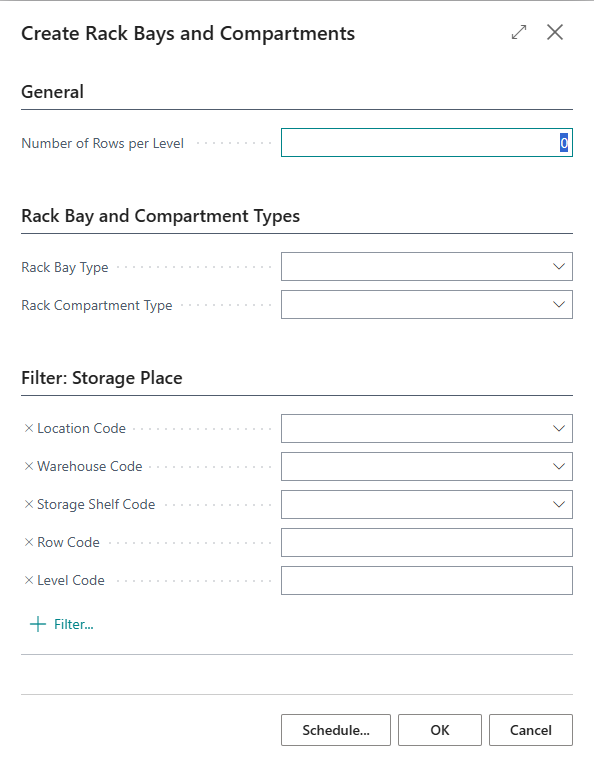
The Create Rack Bays and Compartments report generates rack bay codes and rack compartment codes for storage places automatically. The report is accessible via the Create Rack Bays and Comp. action on the SWMS Rack Bays, SWMS Rack Compartments and SWMS Storage Place List pages.
Filter selection:
The storage places to be processed can be restricted in the dialog using the following filters: Location Code, Warehouse Code, Storage Shelf, Row Code and Level Code.
Number generation schema:
The system processes storage places in ascending order by warehouse code, storage shelf code, row code and level code. The mandatory field Number of Rows per Level defines how many consecutive row codes are grouped into one rack bay. The rack bay code is composed of: warehouse code + storage shelf code + the smallest row code in the bay. For each rack bay, one rack compartment is created per level code; the rack compartment code is derived from the rack bay code + level code.
When the warehouse code or storage shelf code changes during processing, the current group is finalized and a new one begins.
Optional type presets:
In the Rack Bay and Compartment Types section, a Rack Bay Type and a Rack Compartment Type can optionally be specified. If left empty, the types can be updated afterwards in the SWMS Rack Bays and SWMS Rack Compartments overviews using multi-selection.