ProGlove MAI Setup
The ProGlove MAI (Mark Assistant Interface) is a small display device worn on the back of the hand and connected to the ProGlove scanner. It enables the position processing in A4.3 to be shown synchronously on a wrist display alongside the MDE, allowing pickers to validate load units and confirm quantities directly on the MAI.
Setup Order
For a new Zebra device with ProGlove MAI, the following setup order is recommended:
- Language: English
- Set up Wi-Fi
- Add Gmail account
- Set device PIN
- Configure DataWedge (see Configure DataWedge)
- Install apps from Play Store: Quicksupport, Zebra Enterprise Browser, Zebra Enterprise Keyboard (alternatively via StageNow barcode, see Configuration Barcodes)
- Install ProGlove Insight Mobile app via barcode (see Install ProGlove Insight Mobile App)
- Add Enterprise Browser license (see Licensing)
- Configure Enterprise Browser via StageNow barcodes if not distributed via Intune (see Configuration Barcodes)
- Set Zebra Enterprise Keyboard as the default keyboard (see Set Enterprise Keyboard as Default)
Configure DataWedge
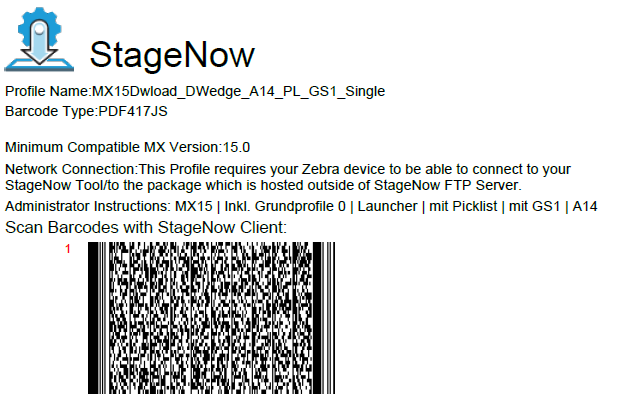
DataWedge is the barcode scanning middleware on Zebra devices. It controls how scanned barcodes are processed and forwarded to apps. For SWMS Mobile to function correctly, four DataWedge profiles must be present on the device:
- Profile0 (default) and Launcher – Core functions of the scanning engine, required for StageNow among others
- DWDemo – Auxiliary profile for basic functions
- SWMS_A14_GS1_Picklist_SingleScan – Ensures correct GS1 encoding for Business Central
Scan the following barcode in the StageNow app to transfer all four profiles to the device:
Warnung
If Profile0 and Launcher are missing, no barcode can be scanned in StageNow. In this case, DataWedge must first be restored manually before the barcode above can be used.
Install ProGlove Insight Mobile App
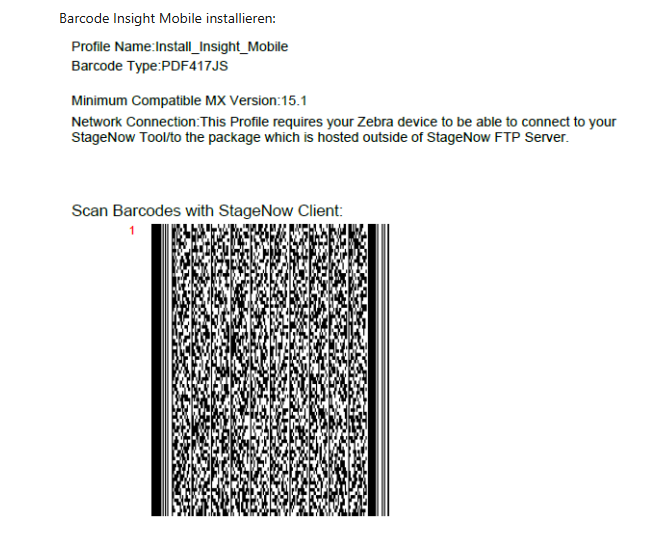
The ProGlove Insight Mobile App can be transferred directly to the device via StageNow barcode, without using the Play Store:
Set Enterprise Keyboard as Default
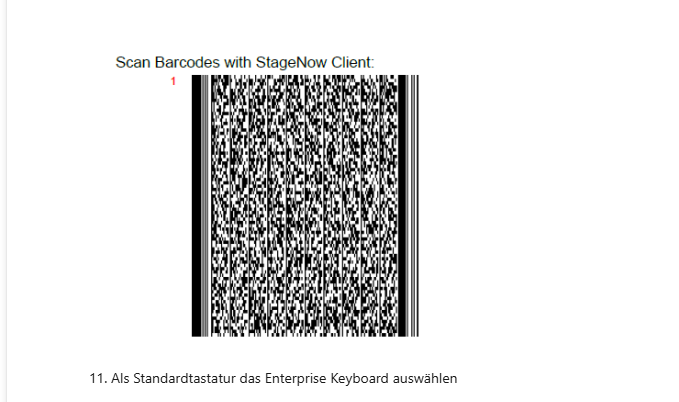
For SWMS Mobile to use the Zebra keyboard correctly, the Enterprise Keyboard must be set as the default keyboard on the device. Scan the following barcode in the StageNow app:
Pairing the MAI
To use the MAI in SWMS picking, it must be paired with the MDE (TC73 or MC3400) via the ProGlove Insight app over Bluetooth.
- Install the ProGlove Insight Mobile App on the MDE (see step 7 of the Setup Order).
- Start the Insight app on the MDE.
- Pair the MAI device with the MDE via Bluetooth through the app.
After successful pairing, the MAI synchronizes automatically with A4.3 position processing as soon as the picker selects a position.
Hinweis
For more information about the ProGlove software and the MAI, see the official ProGlove documentation at https://docs.proglove.com.
Notification for Dialogs and Unsupported Forms
When a dialog appears on the MDE during picking (e.g., a confirmation prompt or error message), or when the process switches to a form for which the MAI has no dedicated display (e.g., A4.1, A4.2, return storage, or serial picking), the ProGlove watch automatically shows the following message:
CONTINUE ON MOBILE DEVICE
This informs the operator to continue on the mobile device and confirm the dialog or complete the action there. When navigating from A4.3 to A4.2 or from A4.2 to A4.1, the message replaces the previous MAI screen. It disappears automatically once A4.3's regular picking view is shown again. No interaction on the ProGlove watch is required.
Activation in Mobile Setup
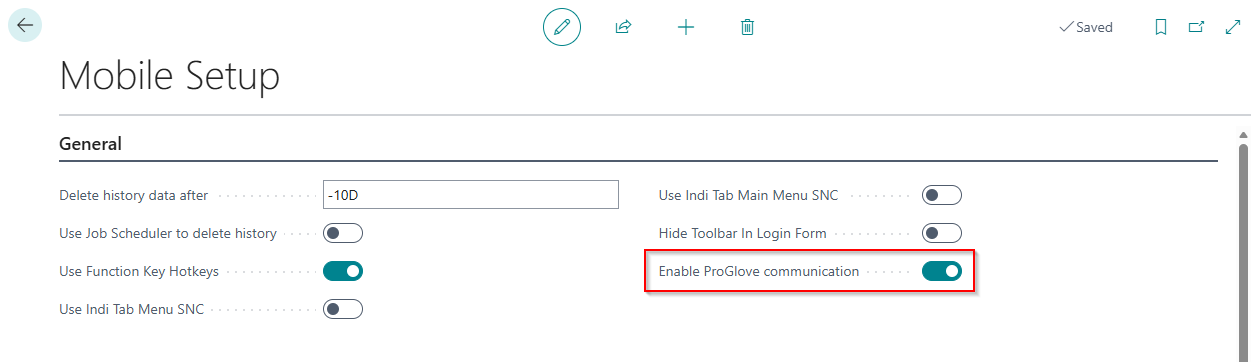
ProGlove communication is controlled by the Enable ProGlove communication field in Mobile Setup. The field is disabled by default and must be enabled for the ProGlove MAI to function.
Deployment via Intune
For deployments using Microsoft Intune, both the ProGlove Insight Mobile App and the Zebra Enterprise Browser configuration required for MAI operation can be distributed to Zebra devices via Intune policies. This enables scalable setup without manually scanning configuration barcodes on each device.