B1 SSCC Info
On this page you can view all information about the SSCCs of the whole Warehouse Receipt. Either scan a SSCC barcode or type in a Source Document or a Warehouse Shipment No.
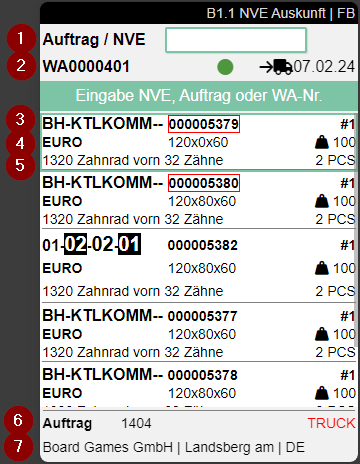
- Scan SSCC, Order or Warehouse Shipment
- Left: Warehouse Shipment No. | Middle: Stock Light from Warehouse Planning | Right: Loading Day
- Left: Storage Place | Middle: SSCC No. (outlined in red when not packaged) | Right: Number of items in SSCC
- Left: Inventory Measure Code | Middle: Dimensions | Right: Weight
- Left: First Item | | Middle: The occasional i means, that this load carrier has a comment text attached. Look it up with F3 | Right: Number of pieces of this Item
- Left: First Item | | Middle: The occasional i means, that this load carrier has a comment text attached. Look it up with F3 | Right: Number of pieces of this Item
- Left: Source Document Type and No. | Right: Shipping Agent Code
- Customer Name, Location and Country Code
Only SSCCs with the states 2,3,4,5,6 or 7 are listed. The SSCCs are sorted first by state and then by storage place in ascending order.
Menu:
A:
- Weights and Measures (F1)
- Print SSCC Label (F9)
- Order Info (F3)
- Information
- Internal Transport (F2)
- Refresh (F8)
B:
- Help