Features
Warehouse Shipment
Change Packaging Team after Picking Starts - Item 143844
The Packaging Team can now be changed after picking has started. In this case, the warning “Warning - Picking has already started. There may be PTUs that need to be rerouted to the correct packaging.” is displayed. The change is applied to all source documents for the warehouse shipment.
Improve Version Update Performance - Item 148076
We found that outdated, unnecessary data migrations were slowing down version updates. Update processing was optimized so that updates complete faster.
Warehouse Receipt
Merge Inventories in Warehouse Receipt When Characteristics Match - Item 145654
Inventories are now merged when a different load carrier is selected in the Load Carrier No. to assign field and the following characteristics match:
- Item No.
- Variant Code
- Lot No.
- Serial No.
- Sell-by Date
This applies only to inventories created in the current warehouse receipt. Additions to existing load carriers are not affected.
Align Inbound Stock Post Columns with Warehouse Receipt Inventory Lines - Item 147527
Inbound stock post lines now use the same column order as the inventory lines in the warehouse receipt. SPU Inventory Unit of Measure appears toward the end of the line. No. of Pieces per SPU and SSCC of Full Pallet are hidden by default and can be shown through personalization. Empties Item Load Carrier is shown only when empties handling is enabled and appears at the far right.
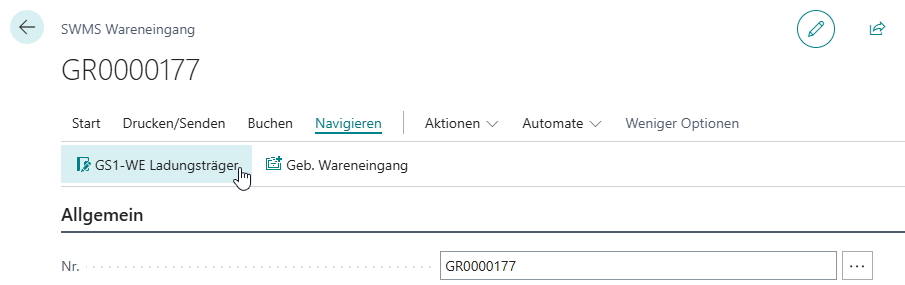
GS1-Whse Rec. Load Carrier Navigation Action in SWMS Warehouse Receipt - Item 147817
The GS1-Whse Rec. Load Carrier action is now available on the SWMS Warehouse Receipt card. It opens the entries filtered to this warehouse receipt. If no GS1 load carrier entries exist, the page opens empty without a message.
Use Inventory Creation from the Packaging Hierarchy in A1.6 - Item 148556
When creating load carriers in A1.6, the Quantity per Unit from the packaging hierarchy's Inventory Creation entry is now also used. If a Carrier - Creation entry is also present, the system calculates the quantity per inventory and the number of inventories per load carrier from these values.
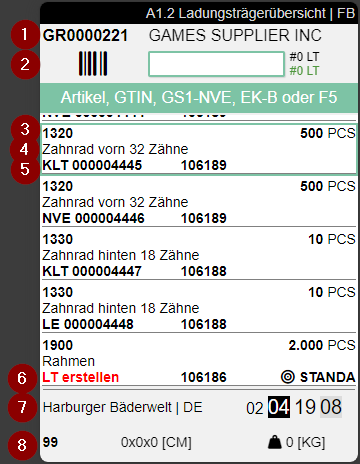
Display Variant on an Additional Line in A1.2 - Item 148354
A variant assigned to the receipt line is now displayed on an additional line in A1.2 Load Carrier Overview. If a separate sell-by date or lot-number line is also displayed, the variant appears on the fifth line. The variant display is marked no. 7 in the screenshot.
Stocktaking
Allow Posting Blocked Inventories - Item 151229
The setup field Take blocked inventories into account is now named Blocked inventories can be posted. Its updated tooltip explains that enabling the setting allows blocked inventory to be posted in stocktaking without an error.
Assembly
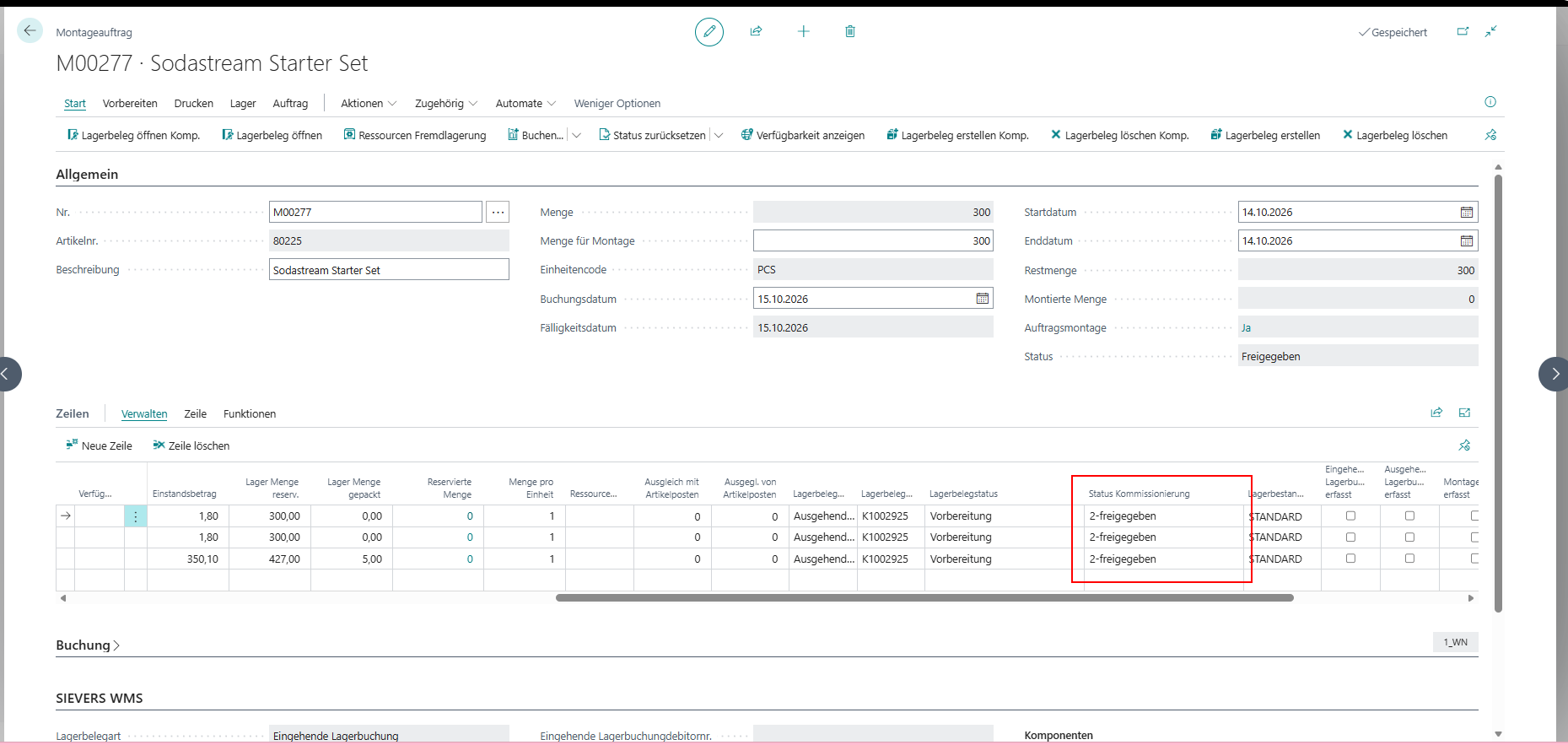
Display Picking State for Each Assembly Component - Item 146098
The Assembly Order line overview now displays the Picking State for each component. If a component is split across multiple picking document lines, the least advanced state is shown; the field remains blank if there is no related picking document. The outbound stock document can only be finalized once the related components have been fully picked.
Production
Reverse Lot-Tracked Production Output - Item 149306
Lot-tracked production output can now be reversed in full or in part. When creating the stock document, SIEVERS WMS uses the assignment to the original item entry from the item tracking lines. The background is that Business Central manages this assignment for lot-tracked items through the item tracking lines and does not allow an additional reference directly on the journal line.
Item Transfer
Align Item Transfer Button Sizes - Item 140904
The Switch Take Out <=> Put To button (F2) now has the same size as All Inv. on 1 LC/SP (F7).
Picking
Show Storage Place Validation on the ProGlove MAI - Item 140994
When a picking position is validated against a storage place instead of a storage unit, the ProGlove MAI now displays SP instead of SU. The value to scan or the scanned value appears on the display; after successful validation, the indicator turns green.
Show Inventory and Serial Number Validation on the ProGlove MAI - Item 140995
When a picking position is validated against an inventory, the ProGlove MAI displays INV. In serial-number picking, INV/SNo. first displays the serial number to scan and then the scanned serial number. The quantity field shows the remaining quantity, and successful validation is shown in green.
Mobile
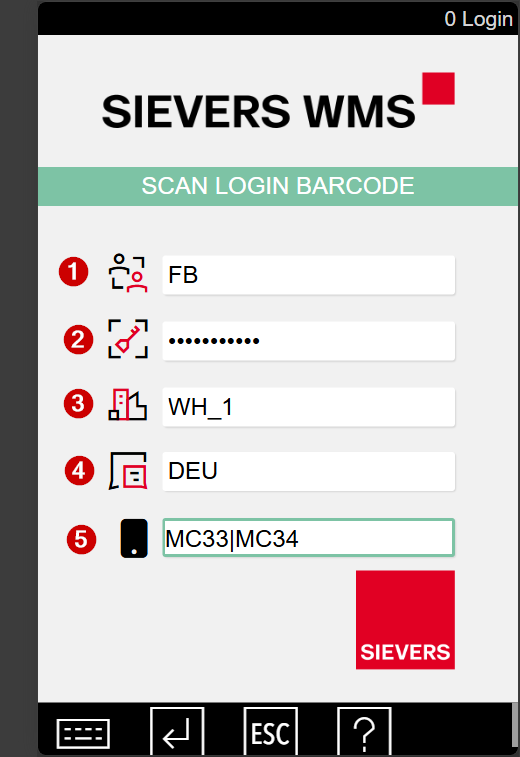
Select Device Model on the Login Screen - Item 145719
When Device Model Selection is enabled in Mobile Setup, users now choose the device model from a list instead of typing it. The list contains all configured device model codes. A model assigned to the user is preselected; if no model is assigned, the selection remains blank. If no device models are configured, login behavior remains unchanged.
Minor Changes
- Item 148635: Columns through Description remain fixed when scrolling horizontally through receipt lines.
- Item 148830: Tooltips have been added.
- Item 148424: Pressing ESC in A1.GS1 now returns to A1.2 instead of A1.1.
- Item 148441: A GS1 scan in A1.1 now prompts the user to enter a GR, item, or LC number.
Bugfixes
Preserve Count Status During GS1 Transfer in Stocktaking - Item 135247
During a GS1 transfer in stocktaking, the original storage place lost its counted status and the existing inventory was not handled correctly in the stocktaking, which could cause posting to fail. The original storage place now remains marked as counted, the stocktaking quantity matches the existing inventory, and the transfer does not add the stock a second time.
Retain Storage Place Assignment During Put-Away - Item 140161
When put-away was performed through a strategy, the selected storage place was not always retained. This affected fixed and chaotic picking places as well as searches for nearby storage places; the assignment is now retained correctly.
Consolidate Packaging Processes When Posting Warehouse Receipts - Item 142091
When posting a warehouse receipt with an order assignment, related load carriers were not always grouped into one packaging process. Load carriers with the same consolidation and warehouse shipment are now grouped together in one process.
Prompt for Missing Lot or Sell-by Date at Warehouse Receipt - Item 146513
During warehouse receipt, the prompt for a missing lot number or sell-by date did not appear in every case. It now appears for each missing value, regardless of whether item tracking is used or other values are already present on the document lines.
Remove Load Carrier Lines When Quantity Check Is Reset - Item 146938
When Quantity Checked was cleared, some load carrier lines remained on the warehouse receipt. They are now removed completely.
Prevent Deletion of Inventory Measures in Use - Item 147216
An inventory measure could be deleted while it was still used by a load carrier, an inventory, or an item's packaging hierarchy. Deletion is now prevented while any of these references remain.
Correct Formatting of Quantity per Inventory - Item 147686
Whole-number values for Quantity per Inventory were displayed with unnecessary decimal places, and the tooltip formatted them as currency. The display now uses only the necessary decimal places, and the tooltip shows the value as a quantity.
Clarify the Packaging Hierarchy Tooltip - Item 148079
The tooltip about handling inventory without a packaging hierarchy did not explain that an existing packaging hierarchy determines Opening Inventory. This clarification has been added.
Carry Customer Assignment into Production Output Entries - Item 150221
When production output was reported for an outside-storage item, the customer assignment on the item was not carried over to the inventory and item ledger entries. The assignment is now transferred to both records.
A3.3b: Load Values from Preselected Inventory Measure - Item 150553
In A3.3b, dimensions and weight were not populated directly from a preselected inventory measure. The values are now loaded without requiring a measure change.
Post Service Orders Containing Resources or Items Not Managed in Inventory - Item 150689
Service orders containing only resources or items not managed in inventory could not be posted. They can now be posted in these cases as well.
Correct Status for Partially Processed Warehouse Shipments - Item 148827
Partially processed warehouse shipments were not always shown with the correct status when the quantity to ship exceeded the quantity processed. They are now shown in yellow, with a tooltip indicating partial processing.
Deleting a Stock Document from a Warehouse Receipt No Longer Fails - Item 148837
Deleting a stock document in a warehouse receipt could fail and block further processing, including when a sales return order was included. The document and its lines are now deleted correctly, allowing the receipt to be processed further.
Prevent Errors When the Same Storage Place Exists at Two Locations - Item 149561
When the same storage place existed at two locations, B5 could select the wrong location during scanning and display an error. B5 now assigns the storage place to the correct location.
Post Transfer Order Receipts with Mixed Sell-by Date Data - Item 150810
Posting the receipt of a transfer order failed when one lot-tracked line had a sell-by date and another did not. Such receipts can now be posted successfully.
Pick Serial Numbers in Any Order - Item 151237
Serial-number picking could not be started with any of the listed serial numbers. A4.3 now processes the picking line matching the first serial number scanned.