Create Warehouse Shipment and Reservations per Item
This page is accessible from the SIEVERS WMS Role Center in the Reports section via the Item related WHS setup, reserve SWMS inventory action. It can also be opened via the Business Central search (Tell Me).
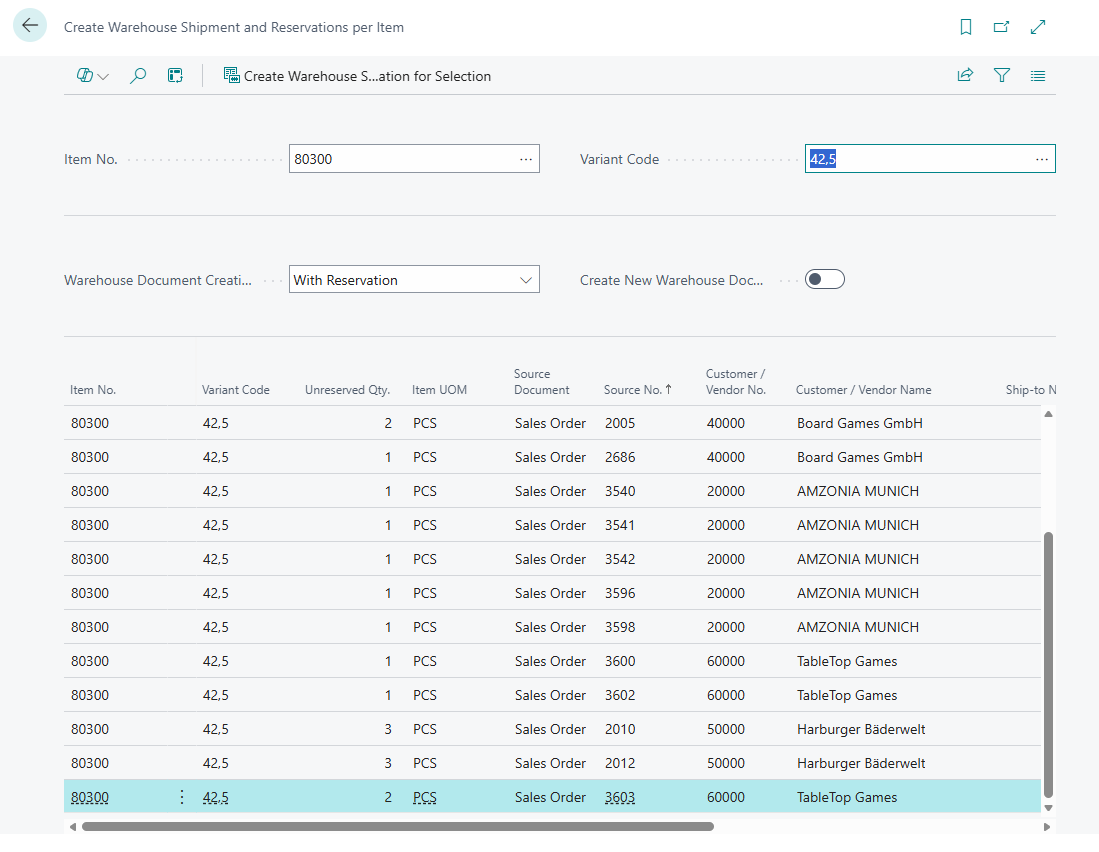
This page shows all open, not yet fully reserved source document lines for a specific item and allows you to create warehouse shipments and reservations for a selection of them in one step.
Lines are sorted in ascending order by loading date. If no loading date is set, the planned shipment date is used equivalently. The second sort criterion is the source number.
Color coding of lines:
- Normal: Inventory fully available
- Yellow: Inventory only partially available
- Red: No available inventory
Filters
- Item No.: Filters the list to a specific item.
- Variant Code: Further filters by a specific variant.
Options
- Warehouse Document Creation: Controls whether a SWMS stock document with reservation is also created. Possible values:
- With Reservation: A warehouse shipment is created (if not already present) and an outbound stock document line is created, reserving the available inventory against the order.
- Without Reservation: Only a warehouse shipment is created. No reservation is made in the SWMS inventory.
- Create New Warehouse Document: Controls how existing warehouse shipments are handled.
- Active: A new, separate warehouse shipment is always created for each line. An existing warehouse shipment is cleaned up first (the affected shipment line is deleted). This is not possible if a stock document is already attached to the shipment line — in that case, processing is aborted with an error message.
- Inactive: If a warehouse shipment already exists for the source line, it is reused. If none exists, a new one is created. This setting is typical when the warehouse shipment automation has already created shipments and only the reservation needs to be added.
Lines
- Item No.
- Variant Code
- Unreserved Qty.: The quantity not yet covered by a warehouse document or reservation.
- Item UOM
- Source Document: Type of source document (e.g. Sales Order, Purchase Return, Transfer).
- Source No.
- Customer/Vendor No.
- Customer/Vendor Name
- Ship-to No.
- First Loading Date
- Planned Shipment Date
- Location Code
- Priority
- Warehouse Shipment No.: Already assigned warehouse shipment, if any.
Actions
- Create Warehouse Shipments and Reservation for Selection: Processes all selected lines according to the chosen options. For each line, a warehouse shipment is created (or an existing one is reused) and — when set to With Reservation — an outbound stock document is created that reserves the inventory. For lines with partial availability (yellow), the stock document is created only for the actually available partial quantity. After processing, the list is refreshed: successfully processed lines disappear because the unreserved quantity is now 0.
Usage notes
The typical use case is targeted, manual pre-reservation of a specific item outside of the regular automation cycles. For example: a delivery of an item arrives in the warehouse and there are multiple open orders for it. Using this page, the planner can create a warehouse shipment and reservation for all orders for that item in one step — sorted by urgency and without waiting for the next automation run.
The page also shows lines that already have a warehouse shipment but no SWMS stock document yet. This is the typical state after a warehouse shipment automation run when the stock document automation has not yet run. In this case, Create New Warehouse Document = Inactive is recommended so that the order remains in the existing, potentially consolidated warehouse shipment.
Hinweis
The page only considers released source documents (sales orders, purchase returns, transfer orders) at locations with active SWMS warehouse management.