Main Menu
You can access the individual functions of the WMS via the MDE main menu. The menu is divided into several sections: A, B and C.
- A: Core functions in the warehouse (warehouse receipt, internal transports, transfer, picking, packing, loading)
- B: Supplementary functions (SSCC info, SU label, inventory adjustment, warehouse receipt unloading, stocktaking)
- C: Production takeout and supply
Accessible from every area: Information, Team / Forklift
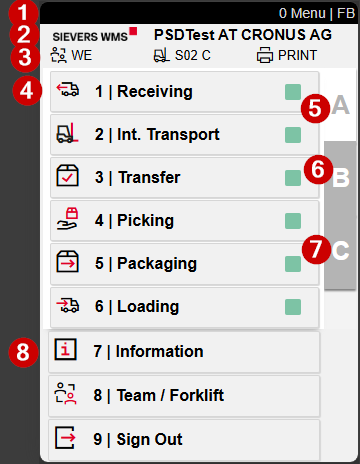
- Title bar: page name and no. user abbreviation (e.g. FO)
- Company logo (here SIEVERS WMS) with system environment and company (e.g. PSDTest AT CRONUS AG)
- Currently selected team (WE), forklift (W09) and active printer station (PRINT) - if the printer station needs to be changed, this can be done automatically in the main menu by scanning the printer station label, or manually in the Team / Forklift selection.
- Function list of the active area (here area A) - call up the individual WMS functions via the number (1-9) or by touch
- Area selector A - core functions in the warehouse
- Area selector B - supplementary functions
- Area selector C - production takeout and supply
- Accessible from every tab: Information (7), Team / Forklift (8) and Logout (9)
To switch tabs using the keyboard on the ZEBRA MC3400/3300, press P1.
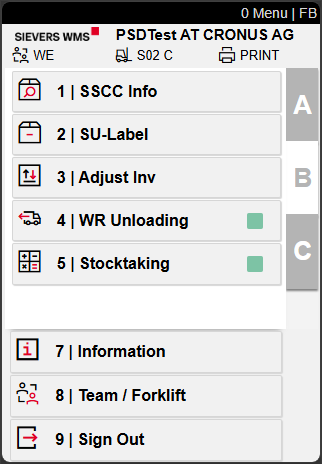
The descriptions of the individual functions can be found below.
WorkIndicator
There are mint green or grey squares at each function call. This is the WorkIndicator. It is meant to help warehouse staff quickly see whether there is currently work in this area or for this team, and how much. The colors mean the following:
- Grey: There is currently nothing to do in this area or for this team
- Green: There is work to be done in this area or for this team
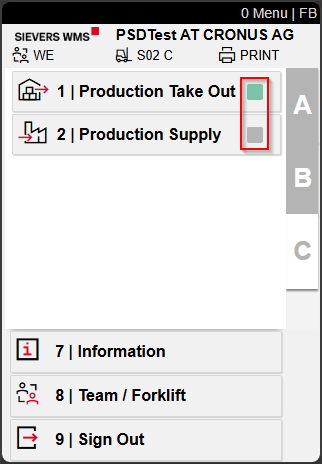
The WorkIndicator is shown at various places in the program to help with the daily work and to make coordination within the team easier.
Structure of the functions
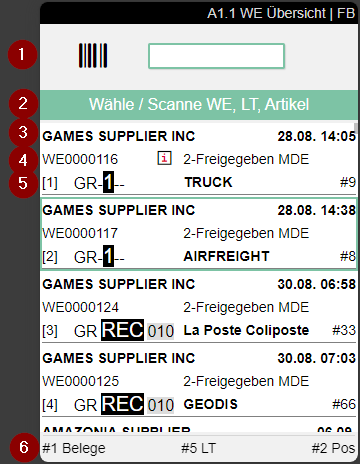
Each warehouse function is divided into several task levels to structure work in the MDE uniformly. As a rule, the functions are structured as follows:
- Level: Process overview
- Workload and work sequence
- Level: Position overview
- Scope of the individual process
- Level: Position processing
- Checking and processing
Example:
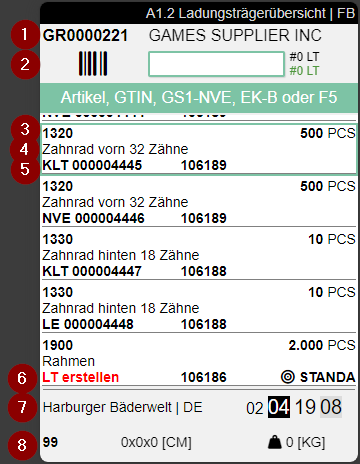
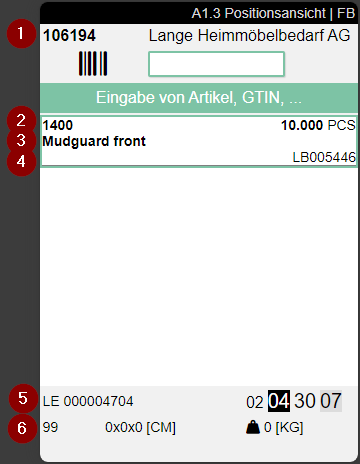
There are also further, specialized sub-pages depending on the process, to make the work easier.
Function Descriptions
Menu page A
Warehouse receipt:
- Unloading incoming transports and creating warehouse receipts
- Warehouse receipt inspection (labeling load carriers and goods, scanner-supported check of the labeling, visual inspection of quantities & items)
- Load carrier creation, if load carriers have not yet been created in advance in the SWMS warehouse receipt
- Checking the load carrier creation, if load carriers have already been created in advance in the SWMS warehouse receipt
- Warehouse receipt with GS1 barcodes
- Posting the warehouse receipt
Internal transports
- Moving load carriers of any type individually or several at once
- Checking, correcting dimensions and weights
- Option to reprint the label or correct quantity assignments
Transfer
- Transfer of (partial) item quantities between load carriers, e.g. to consolidate open quantities or correct quantity assignments
Picking
- Assembly of item quantities according to customer requirements
- Pick & Pack during picking, i.e. the items are packed directly into the shipping packaging (SSCC = Serial Shipment Container Code)
Packing
- Checking, consolidating and packing the picked item quantities
- Packing item quantities into shipping packaging (SSCC = Serial Shipment Container Code) according to customer and transport requirements
- Labeling the SSCC according to customer and transport requirements
Loading
- Assignment of load carriers (SSCC = Serial Shipment Container Code) to means of transport (truck, container, etc.)
Information
- Information on storage location, load carrier, item or stock
- Can also be called directly from most functions using the right arrow key
Team / Forklift
- Switch team, forklift or printer station
Logout
- Log out of the MDE at the end of work or when switching to another device
Menu page B
SSCC Info
- Display of all SSCCs for a warehouse shipment or order
- Can be used to check when a warehouse shipment is due to be sent
- Can be used to merge SSCCs of a warehouse shipment
SU Label
- Print an SU label
- If an SU label is lost, this function offers the option of printing a new label in a controlled manner
Adjust Inv
- Recording a stock discrepancy to start a proper stocktaking
- Currently only possible if no picking points to the storage place and no PTU or SSCC is located at the storage place
WR Unloading
- This function is used when work in the warehouse receipt is divided among several people. There are forklift drivers who only unload
- If the work is not divided, unloading can also be started from A1
- Unloading is used for the initial placement of a delivery on the warehouse site. It can be used to carry out an immediate check upon receipt and to document it, e.g. with photos
Stocktaking
- Document-free processing of the stocktaking
- B5 allows you to carry out the permanent inventory as well as a cut-off stocktaking
Menu page C
Production Takeout
- This function is used to take item quantities for production out of the warehouse. The takeout can be based on production orders or on replenishment values
- In production takeout, a load carrier with several positions can be assembled and either delivered directly to production or stored temporarily to then be distributed in two stages using C2 - production supply - to any workstations in production
Production Supply
- This function is used to distribute the load carriers created in C1 for production to one or more destinations