E-Rechnung Report Parameters
On the E-Rechnung Report Parameters page, you define the settings SIEVERS E-Rechnung uses to generate the PDF output of a document. Settings can be stored globally or specifically for a customer or vendor, and separately for each document type and report.
Warnung
PDF output through the report parameters described here requires the relevant documents to be output using reports with an RDLC or Word layout. Custom report modifications or third-party add-ons may affect or prevent PDF and e-invoice generation. Any changes required to existing reports must be analyzed and assessed separately.
Hinweis
This feature is available for AL versions and C/AL versions from NAV 2016 onward, including NAV 2016 through NAV 2018 and BC 14 C/AL. It is not available in NAV 2015 and earlier.
What are report parameters?
A report in Business Central is a template that prepares document data for output, such as a PDF. The report determines which document data and layout appear in the PDF.
Before a report runs, its report request page can be opened. There, you select the options and filters offered by that report. Depending on the report, you can use them to define, for example, which data is included or how it is sorted and displayed.
The selection on the report request page is stored as XML and passed to the report as report parameters. A report parameter profile is therefore a saved selection for a specific report, not a copy of the report or the document.
What can you control?
A report parameter profile can ensure that a PDF is generated with the desired report settings when it is
- sent as an additional e-mail attachment,
- embedded in XRechnung/UBL, or
- embedded in a ZUGFeRD PDF file.
When multiple PDF paths are used within one export, the resolved parameters are used consistently for the same report. For example, this prevents a manually generated PDF from using different filters or options than the PDF embedded in the e-invoice or attached to the e-mail.
Where do you find the profiles?
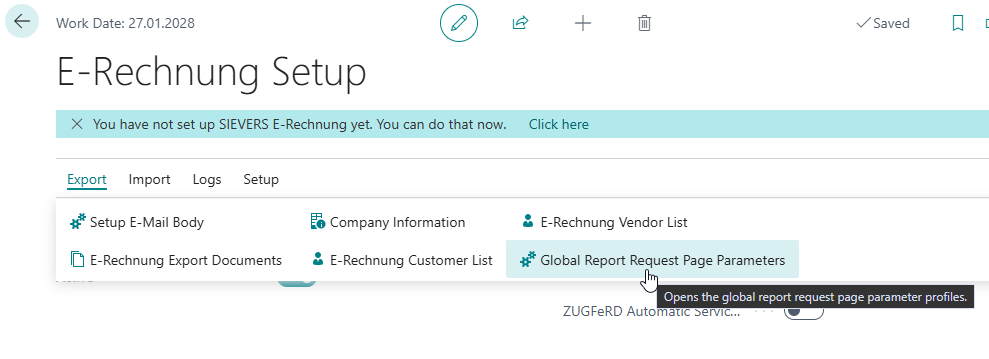
- Global Report Request Page Parameters: On the E-Rechnung Setup page, open this action in the Export menu. These profiles apply to all customers and vendors for which no account-specific profile exists.
- Report Request Page Parameters: In the customer or vendor list, open the action with this name. These profiles apply only to the selected account.
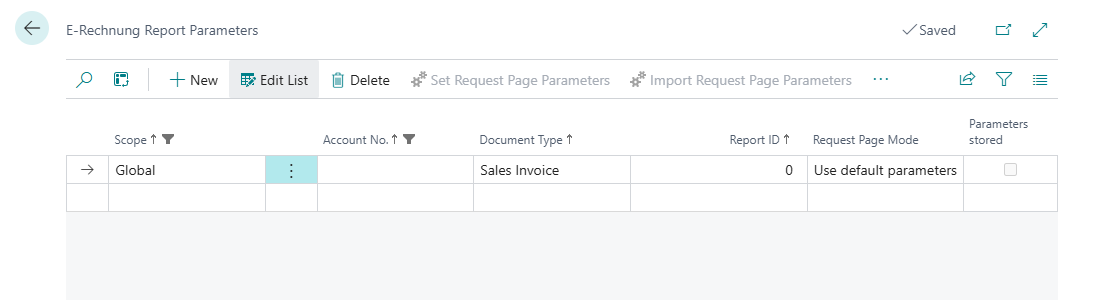
A profile is identified by Scope, Account No., Document Type, and Report ID. Supported document types are sales invoices, sales credit memos, service invoices, service credit memos, purchase invoices, and purchase credit memos. The Report ID must match the report selected for the document type.
Set up a profile
- Open the global profiles or the profiles for the required customer or vendor.
- Select the Document Type and Report ID. You can use the Report ID lookup to select the report configured for the document type.
- In Request Page Mode, select Use setup parameters.
- Select Set Request Page Parameters. The report request page opens. When you close it, your selection is stored as XML in the profile.
If parameters are already stored, you must confirm that they should be replaced. Alternatively, use Import Request Page Parameters to import an XML file containing request page parameters. Use Clear Request Page Parameters to remove the stored parameters.
Request page modes
The Request Page Mode field provides three options:
- Use default parameters: Stored parameters are not used. The report runs with its default values. This is also available for reports without relevant request page settings.
- Use setup parameters: The parameters stored in the profile are used when the report runs. This mode is intended for automatic posting and job queue processing because it does not require user interaction.
- Show request page: During interactive processing, the report request page opens. Stored parameters are used as the starting values and can be adjusted for the current process. The adjusted selection is not automatically saved to the profile; use Set Request Page Parameters to store it permanently.
Resolution and background processing
For a customer or vendor, SIEVERS E-Rechnung first searches for a profile for the specific account. If no matching profile is found, it uses the global profile for the same document type and Report ID.
Parameters from another report or document type are not reused. If a required parameter profile or stored parameters are missing during background processing, the process is stopped in a controlled way and a clear entry is written to the E-Rechnung/error log.
During manual processing, the report request page can be opened and adjusted. For automatic posting and job queue processing, the required selection must be stored beforehand as Use setup parameters.